PH
PHKingSemreh
Eternal Poster
How to edit your MS Office Professional Plus 2019 before Installing to remove some package
Download: You do not have permission to view the full content of this post. Log in or register now.
Steps:
1- Download and extract using zip, winrar or 7zip.
2- goto mysetting and open it with notepad or any similar.
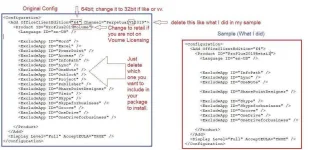
3- Edit as shown in Table 2. (Take Note: The one that you want to remove on the line is one of the packages that you want to include)
4- If you are a Volume Licensing Package No Need to change accordingly but if you are on a Retail License, you have to as shown in Table 2. You can also change 64bit if you are a 32bit user and vise versa.
5- If you are done then Save.
6- Put in the same Folder this Tool and your MS Office Pro Plus 2019 installer.
7- Run as administrator the start cmd then Bing... your good to go take a coffee while waiting to finish.
Table 1
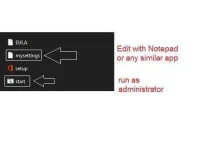
Table 2