PH
PHgo to browser and type chrome://flags
Heavy Ad Intervention
Intrusive adverts are both the bane of the Internet but also, unfortunately, its life force. By default, Chrome does a so-so job of blocking ads for you (unless they’re Google ads, in which case it’s open season!), but you can enable this flag to bolster Chrome’s ad-blocking defenses.Search for “heavy ad intervention” in Chrome flags and enable it when you find it. This flag will hone in on ads that use too many system resources, automatic ad videos, and more, blocking them from your browser.

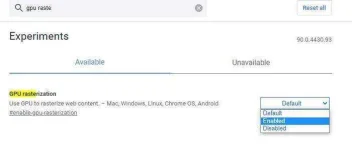
GPU Rasterization
Chrome doesn’t rely too much on your GPU to process images and data, but if you have a dedicated GPU, then there are a few things you can do to offload some of the processing onto it, speeding up the browser.Rasterization is the process Chrome uses to organize website data into the pixels and tangible information you end up seeing on the screen in front of you. It does this by organizing each page into “Tiles,” at which point it effectively paints in the information in each one to add up to the whole you see in front of you.
Enabling “GPU rasterization” gets your GPU to always do the above process instead of your CPU (or processor). This can make browsing faster if your CPU isn’t particularly powerful or, conversely, if your GPU is very powerful.