 PH
PHtrevordahl
Journeyman
With this trick, you can disable access to your USB(Universal Serial Bus) ports on your Windows based PC to prevent people from taking out data without permission or spreading viruses through the use of USB (pen and flash) drives.
You do not have permission to view the full content of this post. Log in or register now..
Try it yourself to make your PC invulnerable from data theft and malware which spread through USB ports. This works on Windows XP, Windows Vista, Windows 7 and Windows 8.
Note: This trick also disables access to your USB connected peripheral devices. So, do not use it if you have USB connected keyboard and mouse.
You do not have permission to view the full content of this post. Log in or register now..
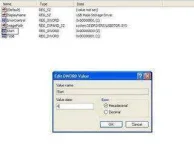
- Navigate to HKEY_LOCAL_MACHINE\SYSTEM\CurrentControlSet\Services\usbstor.
- In the work area, double click on Start.
- In the Value Data box, enter 4.
- Click on OK.
- Close Registry Editor and refresh your desktop.
- To re-enable access to your USB ports, enter 3 in the Value Data box in Step 6.
Try it yourself to make your PC invulnerable from data theft and malware which spread through USB ports. This works on Windows XP, Windows Vista, Windows 7 and Windows 8.
Note: This trick also disables access to your USB connected peripheral devices. So, do not use it if you have USB connected keyboard and mouse.

