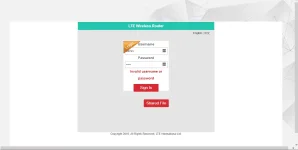
❓ Help PLDT Home R281 nag update ng Software Version (v004.1). Openline di na gumagana.

Status
Not open for further replies.
Nag update ang PLDT Home R281 and hindi na gumagana yung openline na AT+CLCK="PN",0,123456,16
Error na ang nakalagay.
Also, openline na sana ako kaso after the update RED na ang signal. Kaya nag system restore ako planning na i-openline ulit kaso error na yung AT+CLCK="PN",0,123456,16
Any solution?
 
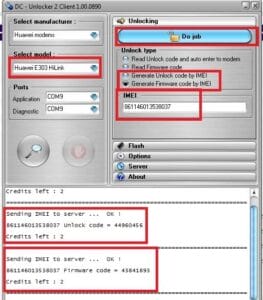
Try mo Dc unlocker na Fullcrackzzeddd.
version, Lods

Copy mo nalang ka ph para ma try mo tutz. Burahin ko ron later kac makalat dto sa thread

Credit and Sources to You do not have permission to view the full content of this post. Log in or register now.

Download link Google drive

Dc Unlocker Free Username And Password With Credits​

Dc Unlocker Free Username And Password With Credits

Dc Unlocker Free Username And Password With Credits


Huawei Honor 6C
DIG-L21
Huawei Nova Smart
DIG-L01
Huawei Diego
DIG-AL00
DIG-L01
DIG-L03
DIG-L21
DIG-L22
DIG-L23
DIG-TL10
Huawei GR3 2017
DIG-L21
Username: New Huawei
Password: Free Test
How to Crack DC – Unlocker 2?

1. Extract the Content of the .rar “DC – Unlocker 2 Client 1.00.1374” File
2. Once You Extracted All Compressed Files, Run Main Setup “dc-unlocker2client.exe” File.
3. Disconnect the Internet Connection “Important” and Plug Your USB Modem Device with a Different Provider Sim. (Note! Only for Huawei Users, Don’t Need to Swap Any Sim). and *********** Modem to the USB Port.
4. Choose What “Manufacturer” That Your Modem Device Is. (Huawei Datacards or Zte Datacard… Choose That Matches on Your Modems.)
5. Click the Magnifying Glass at Left Right Corner, and It Will Search for Plugged USB Modems Phone or Device.
6. Once the Modem Device/Phone Is Detected, Go to Login Page, Type Whatever You Want. It’s Just a Lame Login System.
7. Click on Unlocking Tab, Then Choose “Unlock” Button.
8. Wait Till the Unlocker Program Says That, Unlock Is Successfully Done.
9. Now, Enjoy Your Unlocked Modem Device Free.
—————————————-
Username: New Huawei
Password: Free Test
—————————————-
 
3.5G or Hspa+ lang pala yang Zte mf65m/mf65+, ayon kay Sir Jhowell. Parang mas maganda pa bumili ka new wifi na, Lods. Kac nasa 500php to 650php nalang 4G LTE wifi sa ngayon, tapos yung pocket wifi Lte Advanced 995 nalang za ngayon, dc unlocker remedyo jan sa wifi mo or yong mrt usb dongle. Medyo mahal unlock nyan 200 to 300 sa mga bangketa. Goodluck, mas maganda new model ka na yung Globe Huawei 5573s-933 ba yun unlockable via jumper mode at debrand firmware
 
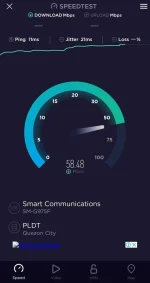
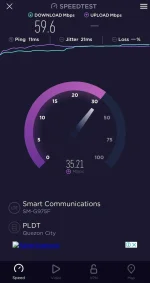
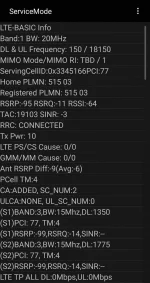
With the R281 the speed that we are getting is also restricted. This is my Speed Test Result using my phone same SIM CARD that I'm using with my R281. Way better with the R281 BAND 1 I'm only getting 30 to 40 mbps DL and 20 to 30 mbps UP.

Screenshot_20210721-202637_Speedtest.jpg
Screenshot_20210721-202654_Speedtest.jpg
Screenshot_20210721-202725_Service mode RIL.webp
 
Status
Not open for further replies.

About this Thread

  • 1K
    Replies
  • 93K
    Views
  • 156
    Participants
Last reply from:
Kingkong-privacy

Trending Topics

Online now

Members online
1,075
Guests online
1,201
Total visitors
2,276

Forum statistics

Threads
2,271,826
Posts
28,938,281
Members
1,237,860
Latest member
gstave_fox
Back
Top