❓ Help PLDT Home R281 nag update ng Software Version (v004.1). Openline di na gumagana.

Status
Not open for further replies.
Nag update ang PLDT Home R281 and hindi na gumagana yung openline na AT+CLCK="PN",0,123456,16
Error na ang nakalagay.
Also, openline na sana ako kaso after the update RED na ang signal. Kaya nag system restore ako planning na i-openline ulit kaso error na yung AT+CLCK="PN",0,123456,16
Any solution?
 
[XX='_ameee, c: 1351498, m: 1766906'][/XX] Hanap ka po sa youtube po meron po tutorial dun via Huawei Terminal po. Yan kasi ang pinka unang Software version kaya pwd payan dun.
 
I have news, the archive contains the nginx web server with an updated interface:
You do not have permission to view the full content of this post. Log in or register now.

Unpack the archive and run nginx.exe
after that open the address You do not have permission to view the full content of this post. Log in or register now. in the browser
Enjoy it.
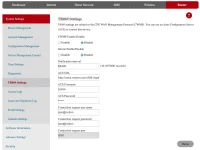
On the Router tab, you will find the TR069 Settings page
Disable it
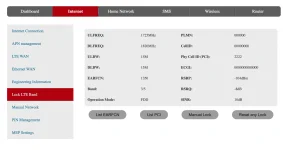
On the Internet tab you will find the Lock LTE Band page
On the page you will see information about the current connection
And 4 buttons
The List EARFCN and List PCI buttons allow you to lock from a list of available options. However, not all available options are shown in this list. If you are currently using band FDD, then only FDD will be in the list. If TDD, then only TDD will be in the lists.
The Manual Lock button allows you to manually set the parameters to lock. The principle of operation is the same as for the cell lock command. Check this post for undestanding: #25
Reset any lock button - removes any lock
1625811507198.png


1625815532531.webp
 
[XX='EugeneKey, c: 1354177, m: 1668473'][/XX] thank you very much for this but how do we upload it do we need to access first 192.168.8.1 interface and upload it there for firmware version 2.2
 
It works sir EugeneKey, you are a life saver for a student like me. Saves me a lot of money (because I am saving money for a new modem) for my board exam who needs stable internet on online review. May God bless you sir. No need to buy new modem anymore. :D
 
Status
Not open for further replies.

About this Thread

  • 1K
    Replies
  • 93K
    Views
  • 156
    Participants
Last reply from:
Kingkong-privacy

Trending Topics

Online now

Members online
1,078
Guests online
1,211
Total visitors
2,289

Forum statistics

Threads
2,271,924
Posts
28,939,015
Members
1,237,917
Latest member
edededed
Back
Top