 PH
PHUnderArrest12
Grasshopper
Office Click-to-Run with VL Convertion
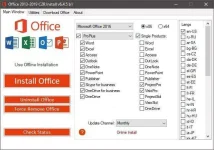
You do not have permission to view the full content of this post. Log in or register now.
1. Extract the file
2. Open OInstall.exe if uac is not disabled please click yes
3. Click Install wait until 100% if prompt your microsoft office is installed do not close the OInstall.exe
4. Go to Utilities and Click convert VL and click yes if prompt just wait a while if says completed
5. Activate your Office
You do not have permission to view the full content of this post. Log in or register now.
1. Extract the file
2. Open OInstall.exe if uac is not disabled please click yes
3. Click Install wait until 100% if prompt your microsoft office is installed do not close the OInstall.exe
4. Go to Utilities and Click convert VL and click yes if prompt just wait a while if says completed
5. Activate your Office
