 PH
PHoutsidecap
Forum Guru
Updates are important for your safety. It is suggested you to get your Windows always updated.
But it's really frustrating to me, that Windows 10 interrupts my work and makes me reboot my PC to install their update/upgrades. Unfortunately, there is no way to control Windows updating using the Windows interface.
In the old days of Windows 7, there was an ability to control updates using a Windows control panel applet.
In Windows 10 days this option has been removed.
Why is it bad?
- Windows update does really slow down of your PC.
What if you need to complete an urgent work or you just want to play games, but windows update stops you from doing so by slowing down your system.
Windows Update can break your work and pleasure of playing games. - You open your laptop just to send a message, but it starts with a black screen: "Upgrading Windows...".
You have no time to wait for finishing updates. But you can't stop it!
Hah! It does not work!
Microsoft prevents disabling Windows updates using several methods:
- Special scheduled task (USOClient,Windows10Upgrade, UpdateAssistant).
- Hidden service "WAAS Medic".
Take control of your life and Windows updates!
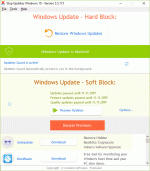
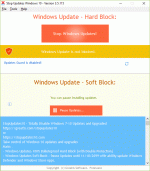
StopUpdates10 has 2 modes:
Windows Updates 100% Bulleteproof Hard Block (with Double Protection).
Windows Updates Soft Block - Pause Updates until 11/18/2099 with ability update Windows Defender and Windows Store Apps.
Features:
- Stops Windows updates.
- Stops forced upgrades.
- Stops annoying upgrade notifications.
- Restore updates with one-click.
- Pauses updates.
- Disables Windows 7-8 'End of support' and 'End of Service' notifications.
Benefits:
- Easy to disable and re-enable Windows updates.
- StopUpdates10 does not delete files, does not change file rights or another destructive actions.
- StopUpdates10 is lightweight.
- StopUpdates10 is free of charge.
What's the difference between 'stop updates' and 'pause updates'?
- Stopping updates prevents downloading and installing any updates.
It blocks the Windows update service. - Pausing updates only block installing, not downloading, updates.
Microsoft allows you to pause updates for limited number of days and only once.
You can not pause updates again after resuming.
- You can pause updates until up to 2099 year.
- You can pause and resume updates as many times as you want.
- You can set different pause date and time for Feature updates and for Quality updates.
Feature update is a new version of Windows. It is installed as an upgrade to the existing version with changing the build number.
Feature update includes new features and updates.
Quality update contains only cumulative updates to the existing version without new features.
Download Links:
You do not have permission to view the full content of this post. Log in or register now.


