 PH
PHDisclaimer : Unlocking the bootloader with void your phone's warranty. Think and proceed at your own Risk.
: The PHC Forum and the thread starter has no obligation and liability whatever happen to your device.You have been WARNED!!
:If you still insist to proceed with the tutorial,you agreed the above mentioned DISCLAIMER.
Unlocking the Bootloader on Vivo Y02s
1. Status Validation
First you need to understand if bootloader is actually locked on your Vivo Y02s. After all, it is possible that you purchased the device second hand, and the previous owner has already performed the appropriate steps.
The check is carried out by direct interaction of the phone with the computer. The steps are as follows:
1.1) You do not have permission to view the full content of this post. Log in or register now.
Download and unzip the ADB and Fastboot debug bridge package to your PC.
1.2) You do not have permission to view the full content of this post. Log in or register now.
Download and install the driver to interact with the smartphone using the official Android website.
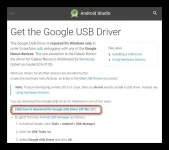
1.3) After installation, the ADB interface should be displayed in the Device Manager.
1.4) Put your smartphone into fastboot mode by first turning it off and holding down the volume down key along with the power button.
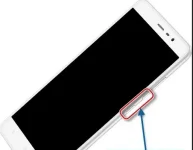
1.5) Connect your mobile device to your computer.
1.6) Launch Command Prompt on your PC.
1 7) Enter the following: "cd [path to the adb and fastboot folder]" and press Enter.
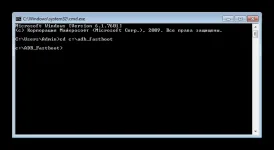
1.8) Use the "fastboot devices" command to detect the phone connected to the PC.
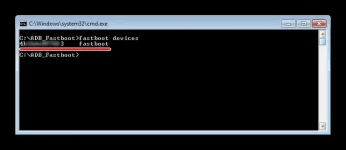
1.9) Enter the prompt “fastboot oem device-info” to determine the bootloader status.
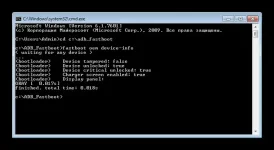
In the information displayed by the command line we will be looking for the line "Device unlocked". If the value opposite it is "false", it means that the bootloader is locked. If “true”, bootloader was unlocked earlier.
2. Sending a Request
To remove the bootloader lock on Vivo Y02s, you need to send the corresponding application to the manufacturer:
2.1) Open the official website of the firmware developer.
2.2) On the unlock page, click the "Unlock Now" button.
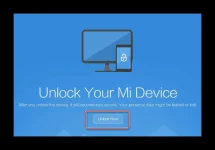
2.3) Authorize your account (it was created when the phone was first set up), and indicate the reason for unlocking (for example, for flashing).
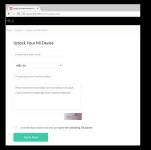
2.4) Confirm ownership of the device using the code from the reply SMS.
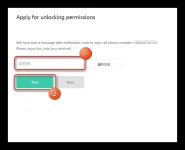
Then you will have to wait for the manufacturer to approve the request, and you will be able to use all the functionality of the bootloader.
3. Approval of the Application and Unlocking
To see if you managed to convince the manufacturer to unlock the bootloader on the Vivo Y02s, open the request page. If approved, a confirmation will be displayed on that page.
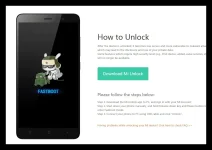
Now the user will be invited to download the software for unlocking the bootloader. It is installed via PC.
Next, you need to open the phone settings, then go to the Developers section and select the "Factory Unlock" item.
In the "Status" you need to go through authorization to the account, which was indicated on the manufacturer's website.
Now put your phone into fastboot mode and run the downloaded software on your computer.

After authorization, you need to connect your smartphone to the PC and confirm the unlocking.
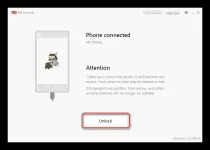
After a couple of minutes, the operation will be completed and the bootloader on the Vivo Y02s will be fully unlocked.
NOTE: Mag feedback kung working para marecommend sa ibang member na naghahanap.
: The PHC Forum and the thread starter has no obligation and liability whatever happen to your device.You have been WARNED!!
:If you still insist to proceed with the tutorial,you agreed the above mentioned DISCLAIMER.
Unlocking the Bootloader on Vivo Y02s
1. Status Validation
First you need to understand if bootloader is actually locked on your Vivo Y02s. After all, it is possible that you purchased the device second hand, and the previous owner has already performed the appropriate steps.
The check is carried out by direct interaction of the phone with the computer. The steps are as follows:
1.1) You do not have permission to view the full content of this post. Log in or register now.
Download and unzip the ADB and Fastboot debug bridge package to your PC.
1.2) You do not have permission to view the full content of this post. Log in or register now.
Download and install the driver to interact with the smartphone using the official Android website.
1.3) After installation, the ADB interface should be displayed in the Device Manager.
1.4) Put your smartphone into fastboot mode by first turning it off and holding down the volume down key along with the power button.
1.5) Connect your mobile device to your computer.
1.6) Launch Command Prompt on your PC.
1 7) Enter the following: "cd [path to the adb and fastboot folder]" and press Enter.
1.8) Use the "fastboot devices" command to detect the phone connected to the PC.
1.9) Enter the prompt “fastboot oem device-info” to determine the bootloader status.
In the information displayed by the command line we will be looking for the line "Device unlocked". If the value opposite it is "false", it means that the bootloader is locked. If “true”, bootloader was unlocked earlier.
2. Sending a Request
To remove the bootloader lock on Vivo Y02s, you need to send the corresponding application to the manufacturer:
2.1) Open the official website of the firmware developer.
2.2) On the unlock page, click the "Unlock Now" button.
2.3) Authorize your account (it was created when the phone was first set up), and indicate the reason for unlocking (for example, for flashing).
2.4) Confirm ownership of the device using the code from the reply SMS.
Then you will have to wait for the manufacturer to approve the request, and you will be able to use all the functionality of the bootloader.
3. Approval of the Application and Unlocking
To see if you managed to convince the manufacturer to unlock the bootloader on the Vivo Y02s, open the request page. If approved, a confirmation will be displayed on that page.
Now the user will be invited to download the software for unlocking the bootloader. It is installed via PC.
Next, you need to open the phone settings, then go to the Developers section and select the "Factory Unlock" item.
In the "Status" you need to go through authorization to the account, which was indicated on the manufacturer's website.
Now put your phone into fastboot mode and run the downloaded software on your computer.
After authorization, you need to connect your smartphone to the PC and confirm the unlocking.
After a couple of minutes, the operation will be completed and the bootloader on the Vivo Y02s will be fully unlocked.
NOTE: Mag feedback kung working para marecommend sa ibang member na naghahanap.
