 PH
PHiamramzkie
Elite
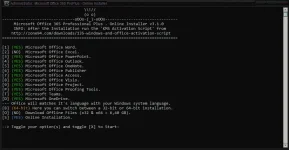
This small Script will download and install the Microsoft Office 365 Professional Plus including all the updates directly from the Microsoft CDN Server.
Includes
Word, Excel, PowerPoint, Outlook, OneNote, Publisher, Access, Visio, Project, ProofingTools, OneDrive Desktop.
How to use ?
Need a fast and stable internet connection. (Its online installation lol!)
Disable Anti-virus before anything else to avoid false positive detection.
Extract the downloaded zip file.
password zip: iamramzkie
Right click on the file "Office 2021 Setup.cmd". Then Run as admin.
Just press the number to change YES/NO
Type X then enter to start
After Successful Installation Run the "Windows & Office Ac†ïvâ†ør.cmd" to activate
Done.
System Requirements
Windows 10/11 x86 (32-bit)
Windows 10/11 x64 (64-bit)
Whats New
official site does not provide any info about changes in this version
File Size: 3.1 MB
You do not have permission to view the full content of this post. Log in or register now.
Credits to its rightful owners.

 enjoy
enjoy