PH
PH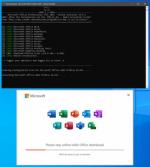
Looking for a seamless way to install Microsoft Office 2021 Professional Plus? The Microsoft Office 365 ProPlus Online Installer is your ultimate solution! This lightweight script downloads and installs the latest version of Microsoft Office directly from Microsoft’s CDN servers, ensuring you get all the updates and features without any hassle.
What’s Included?
The installer provides access to the full suite of Microsoft Office applications, including:- Word: Create professional documents.
- Excel: Manage data and analyze trends.
- PowerPoint: Design stunning presentations.
- Outlook: Organize emails and schedules.
- OneNote: Take notes and stay organized.
- Publisher: Design professional publications.
- Access: Build and manage databases.
- Visio: Create diagrams and flowcharts.
- Project: Plan and manage projects.
- Proofing Tools: Ensure error-free documents.
- OneDrive Desktop: Sync and store files in the cloud.
System Requirements
The installer is compatible with:- Windows 10/11 (32-bit and 64-bit).
Why Choose the Online Installer?
- Direct from Microsoft: Get the latest updates and security patches straight from the source.
- Lightweight and Fast: No bulky downloads—just a small script that handles everything.
- Comprehensive Suite: Access all the tools you need for work, school, or personal projects.
How to Get Started
- Download the Microsoft Office 365 ProPlus Online Installer from our software library.
- Run the script and let it download and install Microsoft Office 2021 Professional Plus.
- Enjoy premium productivity tools right at your fingertips!
You do not have permission to view the full content of this post. Log in or register now.