 PH
PHRequiremenst:
REPL Knowledge
Quick understanding
Knowledge
Wifi
1.Create & Verify an account in REPL. You do not have permission to view the full content of this post. Log in or register now.
2.Once you successfully created & verified an account in REPL visit You do not have permission to view the full content of this post. Log in or register now.
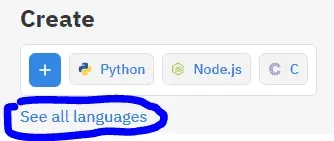
3.Find "Create" & click "See all languages" then find your coding language that you used when making an API:
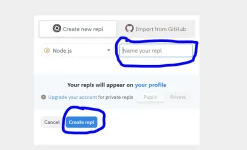
4.A small UI should pop up then find "Name your REPL", then wait for a text to pop up on that input then remove it. In summarizing make sure the "Name your repl" input is empty.
5.Press "Create REPL"
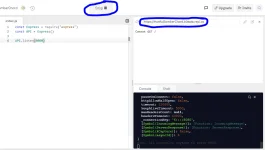
6.Once you successfully placed your code in repl, press "Run".
7.Then it should return the website link on top right.
8.Visit this website. You do not have permission to view the full content of this post. Log in or register now.
9.Create an account & monitor your website. It should run 24/7
Warning: Click "Run" for once only, unless you changed your code or something.
REPL Knowledge
Quick understanding
Knowledge
Wifi
1.Create & Verify an account in REPL. You do not have permission to view the full content of this post. Log in or register now.
2.Once you successfully created & verified an account in REPL visit You do not have permission to view the full content of this post. Log in or register now.
3.Find "Create" & click "See all languages" then find your coding language that you used when making an API:
4.A small UI should pop up then find "Name your REPL", then wait for a text to pop up on that input then remove it. In summarizing make sure the "Name your repl" input is empty.
5.Press "Create REPL"
6.Once you successfully placed your code in repl, press "Run".
7.Then it should return the website link on top right.
8.Visit this website. You do not have permission to view the full content of this post. Log in or register now.
9.Create an account & monitor your website. It should run 24/7
Warning: Click "Run" for once only, unless you changed your code or something.