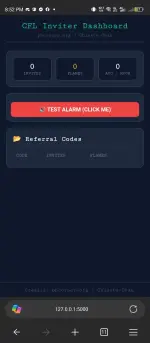
PH
PHChisato-Chan
Elite
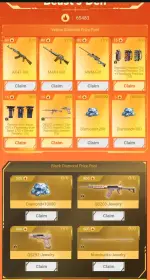
Video Preview:
backup video preview:
You do not have permission to view the full content of this post. Log in or register now.
Full Video Tutorial:
You do not have permission to view the full content of this post. Log in or register now.
 Notice:
This tool is officially created by Chisato-Chan and released on phcorner.org only and free for all phcorner members.
Disclaimer: I Chisato-Chan and phcorner are not liable for any misuse, result or unauthorized use of my tool.This tool will automate your Crossfire Legends invitation code infinitely with Web Dashboard!
 Features:
- 100% Free (DO NOT SELL MY TOOL)
- Auto Farm
- Auto Get Code
- Fast performing task
- Web Dashboard
- Mobile Friendly
- No Network Busy
- Real Time Logs
- Captcha Detector
- Wake Lock Screen
- Auto On/Off Wakelock
- Captcha Alarm
- Unlimited Use
- Free Proxy to bypass Captcha (tutorial)
- Open Source Code
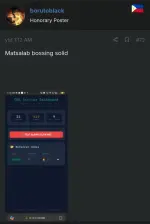
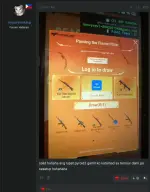
First Few Feedbacks:
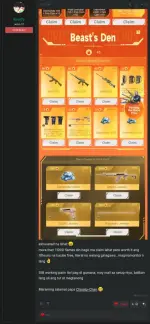
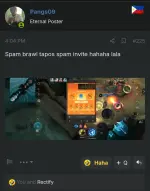
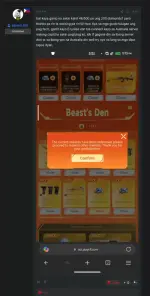
Setup+Tutorial+Tool:
 Special Notice:
Thank you sa lahat ng members na tumutulong magsagot/comment sa mga taong nagtatanong dito about sa thread/post ko

Full Video Tutorial:
You do not have permission to view the full content of this post. Log in or register now.
recommended file manager:
You do not have permission to view the full content of this post. Log in or register now.
Install the following:
1. Microsoft Edge Canary on Play Store
2. Termux on F-Droid (Play store version is outdated and not maintained anymore)
Install and Open termux and run this command:
1.
pkg update && pkg upgrade -y2.
termux-setup-storage3.
pkg install python mpv4.
pip install flask flask-corsNext, Unzip the downloaded autofarm_cf.zip using mt manager
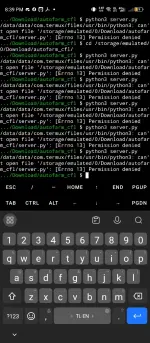
now go to termux locate your autofarm directory using cd command:
sample directory:
cd storage/shared/download/autofarm_cfl/autofarm_cfl
How to set up the GMAIL APP PASSWORD:
Requirements: Your gmail must have turned on two factor authentication. you can do this with google authenticatorNow go to the You do not have permission to view the full content of this post. Log in or register now. then fill up the app name and click create. it will pop up your email app password, copy it then save it for later and you should never share it.
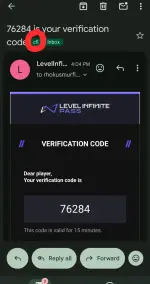
How to make a label filter on incoming messages:
Go to the gmail.com on your browser and turn on desktop view then click the red arrow: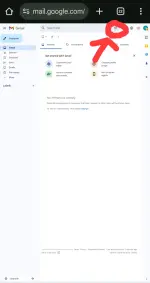
next, fillup the "from" put this email: LevelInfinitePass@account.levelinfinite.com
then click create filter
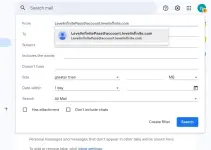
follow this and click create filter
important: cfl label
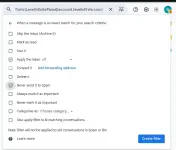
after that letsgo to another step
Setting up the configuration
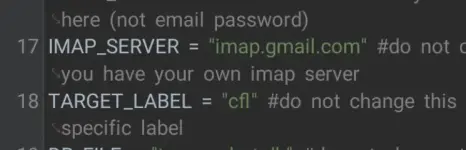
open mt manager, open the unzipped autofarm_cfl then click server.py to open and edit this following: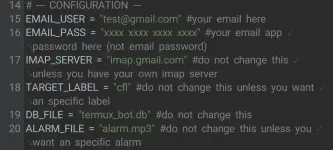
Python:
EMAIL_USER = "test@gmail.com" #your email here
EMAIL_PASS = "xxxx xxxx xxxx xxxx" #your email app password here (not email password)
IMAP_SERVER = "imap.gmail.com" #do not change this unless you have your own imap server
TARGET_LABEL = "cfl" #do not change this unless you want an specific label
DB_FILE = "termux_bot.db" #do not change this
ALARM_FILE = "alarm.mp3" #do not change this unless you want an specific alarm
tampermonkey script:
JavaScript:
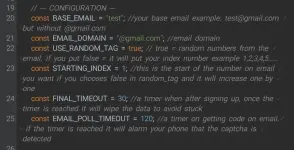
    // --- CONFIGURATION ---
    const BASE_EMAIL = "test"; //your base email example: test@gmail.com but without @gmail.com
    const EMAIL_DOMAIN = "@gmail.com"; //email domain
    const USE_RANDOM_TAG = true; // true = random numbers from the email. if you put false = it will put your index number example 1,2,3,4,5.....
    const STARTING_INDEX = 1; //this is the start of the number on email you want if you chooses false in random_tag and it will increase one by one
    const FINAL_TIMEOUT = 30; //a timer when after signing up, once the timer is reached it will wipe the data to avoid stuck
    const EMAIL_POLL_TIMEOUT = 120; //a timer on getting code on email. if the timer is reached it will alarm your phone that the captcha is detected
after editing the configuration, open Edge Canary > settings > about Microsoft edge > spam click the edge canary version until the developer option is enabled
go back to settings again, click developer option > extension install by crx then install the two crx file extension
now go back to edge canary > menu > extension > manage extension > install tampermonkey and make sure you turn on allow user scripts
now click the tampermonkey extension and copy the tamperscript.js code on the downloaded tool and paste it on tampermonkey then enable tampermonkey and the script.
now go back to termux run this command:
Code:
python3 server.py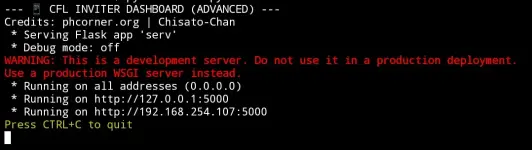
you can go to the web dashbord by entering that You do not have permission to view the full content of this post. Log in or register now. on your browser
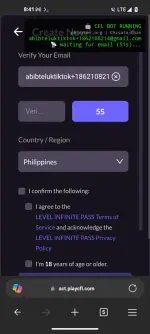
then go back to edge canary and enter your referral link on your edge canary then it will automatically farm your referral link powered by script.
You need to mark all as read your email before you start farming to avoid the otp/code issue
PLS NOTE YOU NEED YOUR PHONE SCREEN MUST ONLY ON EDGE CANARY WHILE DOING AN AUTOFARM TO MAKE IT WORK SMOOTHLY
how to bypass captcha:
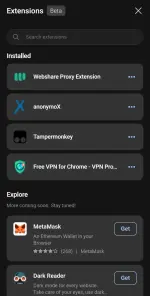
once your phone plays a sound, it's probably a captcha problem and to remove that captcha, all you need to do is connect to the proxy of the proxies extension you installed, you can choose any working server or you can MANUALLY solve the capctha
Happy Farming PHC!
Don't forget to feedback,comment, or ask if you have any question
Download Tool:
You do not have permission to view the full content of this post. Log in or register now.
Frequently Asked Questions (FAQs):
checklist bakit ayaw mag autofill ng code kahit na send sa gmail yung code:
1. hindi naka label yung email ni levelupinfite sa mga bagong email niya. dapat may label "cfl" sa mga paparating na email niya
2. mali yung email app password (magkaiba email password)
3. magkaiba email na nilagay sa server at tampermonkey
4. hindi nag run yung server.py
5. make sure naka read all lahat ng email galing kay infinite pass bago mag farm
kapag wala pa din:
make sure kapag mag comment kayo bakit ayaw mag autofill ng code, send niyo dito sa comment screenshot ng gmail, termux, website, tampermonkey script at yung server.py (paki-takpan/blur yung email app password bago niyo i send)
Question: Is the code from gmail will automatically input on the website or we need to manually put the code?
Answer: This tool is designed to automates everything including the code sent from leveluppass infinite. You don't need to do any manual task, all you need to do is enter your referral link on your browser and you're good to go
Question: The code from gmail won't automatically input to the website
Answer: Make sure your APP PASSWORD is correct and not your truly EMAIL PASSWORD (Search on google what is gmail app password) the app password is not the same as your password for your login. You also need to put the label name "cfl" to all incoming email from levelup Infinite pass
Question: The code automatically put the wrong number
Answer: Make sure you read all email from leveluppass before you start farming.
Question: I'm facing a "Network Busy" error/pop-up.
Answer: The script designed to hide the network busy error/pop-up. If you're facing it, you might be misconfigured the tampermonkey script.
EN:If you are a new member here on phcorner, this is the tutorial how to react the post (hold the like button to see the other emoji)
PH:kung bago lang po kayo dito sa phcorner eto po tutorial kung paano mag react sa post (hold niyo lang like button para makita yung ibang emoji)
credits reaction picture tutorial: RHEUMA
Comment lang kayo dito if may tanong kayo or problema para matulungan kayo