👨‍🏫 Tutorial Block YT ads using Ublock Origin (2023)

​


  1. Remove all existing adblock extensions on your browser.​

  2. Download the uBlock Origin extension for You do not have permission to view the full content of this post. Log in or register now. or You do not have permission to view the full content of this post. Log in or register now..​

  3. If you’re on Chrome, click on the puzzle icon.​

  4. Select “uBlock Origin” and click on the settings icon.​

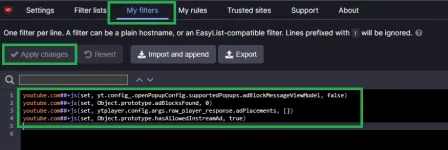
  5. Click on the “My filters” tab.​

  6. Copy and paste the following code:

    You do not have permission to view the full content of this post. Log in or register now.​

  7. Click on “Apply changes” and try watching some YouTube videos.​

​

Note: By applying these filters to uBlock Origin, both the “Video player will be blocked after 3 videos” error and ads on videos should be gone.​

​

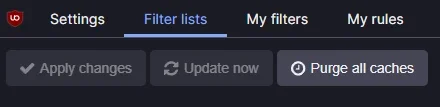
Pag may lumalabas ulit na ads (filter lists - purge all caches - update now)​

1699626760008.png​

​

​


asa.PNG​


About this Thread

  • 19
    Replies
  • 2K
    Views
  • 18
    Participants
Last reply from:
Jairah24

Online now

Members online
1,071
Guests online
13,635
Total visitors
14,706

Forum statistics

Threads
2,366,438
Posts
29,434,944
Members
1,043,989
Latest member
7xzen_
Back
Top