👨‍🏫 Tutorial Block YT ads using Ublock Origin (2023)

Makima Cutieee

Forum Expert


  1. Remove all existing adblock extensions on your browser.​

  2. Download the uBlock Origin extension for You do not have permission to view the full content of this post. Log in or register now. or You do not have permission to view the full content of this post. Log in or register now..​

  3. If you’re on Chrome, click on the puzzle icon.​

  4. Select “uBlock Origin” and click on the settings icon.​

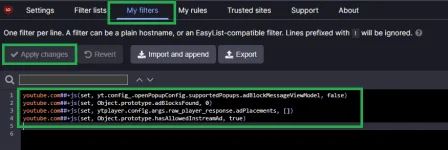
  5. Click on the “My filters” tab.​

  6. Copy and paste the following code:

    You do not have permission to view the full content of this post. Log in or register now.

  7. Click on “Apply changes” and try watching some YouTube videos.​

Note: By applying these filters to uBlock Origin, both the “Video player will be blocked after 3 videos” error and ads on videos should be gone.​

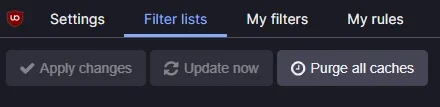
Pag may lumalabas ulit na ads (filter lists - purge all caches - update now)

1699626760008.png


asa.PNG


About this Thread

  • 19
    Replies
  • 2K
    Views
  • 18
    Participants
Last reply from:
Jairah24

Trending Topics

Online now

Members online
1,322
Guests online
1,602
Total visitors
2,924

Forum statistics

Threads
2,315,105
Posts
29,181,140
Members
1,183,428
Latest member
Greenmb
Back
Top