 PH
PHNote: Dapat meron Internet Connection and Dapat Remove mo yung Trial ng Office.
Step 1. Open CDM (Run as Admin)
Step 2. Hanapin mo saan naka Locate yung Office16 Folder kung nasa ProgramFiles or sa Program(x86)
After mo mahanap Copy mo Office16 Paste mo sa CMD
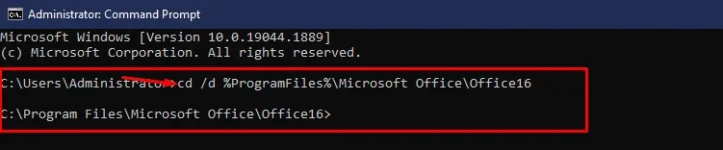
example: cd /d %ProgramFiles%\Microsoft Office\Office16
If your Office is got from Microsoft, this step is required. On the contrary, if you install Office from a Volume ISO file, this is optional so just skip it if you want.
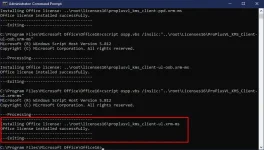
Paste it to your CMD
Step: 4
Use KMS client key to activate your Office.
Make sure your PC is connected to the internet, then run the following command.
Dapat Stable Internet Connection mo
Copy mo lang to lahat then Enter
cscript ospp.vbs /inpkey:XQNVK-8JYDB-WJ9W3-YJ8YR-WFG99
cscript ospp.vbs /unpkey:BTDRB >nul cscript ospp.vbs /unpkey:KHGM9 >nul
cscript ospp.vbs /unpkey:CPQVG >nul
cscript ospp.vbs /sethst:s8.uk.to
cscript ospp.vbs /setprt:1688 cscript ospp.vbs /act
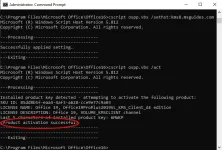
Dapat yan lumabas
Product Activation Successful
Note: If you see the error 0xC004F074, it means that your internet connection is unstable or the server is busy. Please make sure your device is online and try the command “act” again until you succeed.
Step 1. Open CDM (Run as Admin)
Step 2. Hanapin mo saan naka Locate yung Office16 Folder kung nasa ProgramFiles or sa Program(x86)
After mo mahanap Copy mo Office16 Paste mo sa CMD
example: cd /d %ProgramFiles%\Microsoft Office\Office16
- cd /d %ProgramFiles%\Microsoft Office\Office16
- cd /d %ProgramFiles(x86)%\Microsoft Office\Office16
If your Office is got from Microsoft, this step is required. On the contrary, if you install Office from a Volume ISO file, this is optional so just skip it if you want.
Paste it to your CMD
- for /f %x in ('dir /b ..\root\Licenses16\proplusvl_kms*.xrm-ms') do cscript ospp.vbs /inslic:"..\root\Licenses16\%x"
Step: 4
Use KMS client key to activate your Office.
Make sure your PC is connected to the internet, then run the following command.
Dapat Stable Internet Connection mo
Copy mo lang to lahat then Enter
cscript ospp.vbs /inpkey:XQNVK-8JYDB-WJ9W3-YJ8YR-WFG99
cscript ospp.vbs /unpkey:BTDRB >nul cscript ospp.vbs /unpkey:KHGM9 >nul
cscript ospp.vbs /unpkey:CPQVG >nul
cscript ospp.vbs /sethst:s8.uk.to
cscript ospp.vbs /setprt:1688 cscript ospp.vbs /act
Dapat yan lumabas
Product Activation Successful
Note: If you see the error 0xC004F074, it means that your internet connection is unstable or the server is busy. Please make sure your device is online and try the command “act” again until you succeed.