 PH
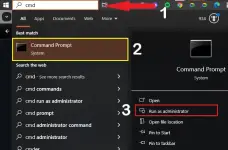
PHStep 1: Type cmd in search box, right click on Command Prompt then select Run as administrator.
Step 2: Copy all below commands, right click to paste into cmd window at once then hit Enter.
Microsoft Office 2021 was activated, and you can start using the applications without any restrictions or limitations.
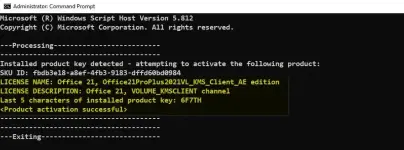
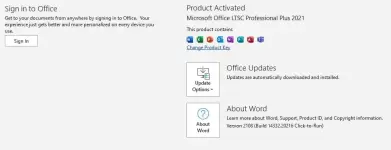
Finally, check the activation status of Microsoft Office 2021. Congratulations! The activation was completed successfully.
Step 2: Copy all below commands, right click to paste into cmd window at once then hit Enter.
Spoiler contents are visible only to Established Members.
Microsoft Office 2021 was activated, and you can start using the applications without any restrictions or limitations.
Method 2: Activate Microsoft Office 2021 using Batch File
Step 1: Right-click the Ac†ïvâ†ør.bat file, then select Run as administrator (You can find it in the Office2021 zip file).Finally, check the activation status of Microsoft Office 2021. Congratulations! The activation was completed successfully.
