 PH
PHChuckY DolL
Elite
did you know that you can access NSFWph.org without any VPN by using Private DNS
steps are:
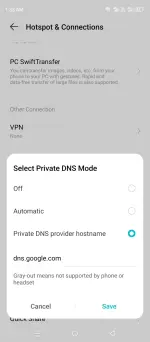
Goto Settings
Goto Hotspot & Connections
Scroll up and look for Private DNS
Input "dns.google.com" on
Private Dns provider Hostname
Save and Exit
or
Goto Settings
Search Private DNS
Input "dns.google.com" on
Private Dns provider Hostname
Save and Exit
For IOS (also for android)
sa wifi settings
Configure DNS for a Specific Wi-Fi Network
This method changes the DNS server for a single Wi-Fi network you are connected to.
1. Open the Settings app and tap Wi-Fi.
2. Find the Wi-Fi network you are connected to and tap the blue "i" icon next to it.
3. Scroll down to the DNS section and tap Configure DNS.
4. Select Manual.
5. Tap Add Server and enter the IP address of your preferred DNS provider "dns.google.com" or (8.8.8.8) You can also add a second one for backup (like 8.8.4.4).
6. Tap Save in the top-right corner.
More Host
👨🏫 Tutorial Private DNS to Access NSFWph.org
Hostname:
dns.google.com (8.8.8.8)
dns9.quad9.net (9.9.9.9)
one.one.one.one (1.1.1.1)
dns.umbrella.com (208.67.222.222)
dns.adguard-dns.com (94.140.14.14)
How to
- ChuckY DolL
- dns nsfwph nsfwph.org private dns
- Replies: 73
- Forum: 🌐 World Wide Web

