 PH
PHPara saan nga ba ang ControlD?
Sagot: Control D (Resolver ID) – Isang DNS service para sa Android, TV & iOS na nagba-block ng ads gamit ang YOUTUBE at nagpapabuti ng privacy gamit lang ang Resolver ID.




For Android users, follow these steps
STEP 1: Go to settings
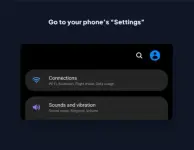
STEP 2: Search Private DNS
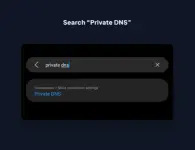
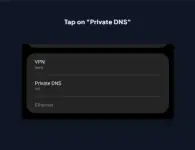
STEP 3: Tap on Private DNS
STEP 3: Tap on Private DNS
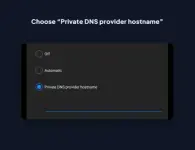
STEP 4: Copy and Paste this hurmnkjd4a.dns.controld.com
For iOS users, follow these steps
STEP 1: Go to Appstore Download Control D
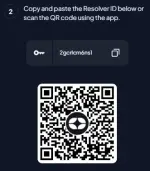
STEP 2: Copy this 2gcrlcm6ns1 and paste it on the app
For Android TV users, follow these steps
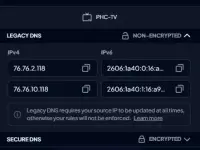
STEP 1: Go to Wifi Settings copy and paste this DNS 1: 76.76.2.118 DNS 2: 76.76.10.118
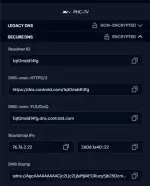
Resolver ID: 1q0mdd14fg
For Window users, follow these steps
STEP 1: Download whether your pc is You do not have permission to view the full content of this post.
Log in or register now. or You do not have permission to view the full content of this post.
Log in or register now.
STEP 2: Install the software copy and paste this 9apu5zf2q2 then run it
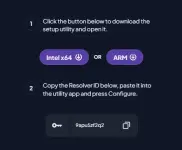
For MAC users, follow these steps
STEP 1: Download whether your MAC is You do not have permission to view the full content of this post.
Log in or register now. or You do not have permission to view the full content of this post.
Log in or register now.
STEP 2: Install the software copy and paste this mzfbj3zsqh then run it
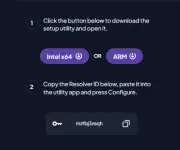
Tadaaa  YouTube, no ads!
YouTube, no ads!Trivia: I intend to install this on my OpenWrt router so that all connected users can access the YouTube app without advertisements.
This may also allow access to additional websites: You do not have permission to view the full content of this post. Log in or register now.
 CAUTION: Yes,
