 PH
PH
Hello Squirrels! Good evening. Just wanna share to you on how to make Eproxy configs for GTMNOLOAD. Just follow the steps lang po.
First. Download mo muna ang Eproxy sa playstore.
After mo ma download ang app. Syempre need din natin ng SSH account. Saan ba pwede gumawa ng ssh accounts? Well dahil may panel na ako. You can use it for this Eproxy app since auto recon mga ports doon. Just visit my panel.
https://phcorner.org/threads/gtmnoload-panel-by-cupcake_13-updates.985990/
After. Makagawa ng account. Just copy the account details in your notepad.
1. Open the Eproxy App. Kung ano lng nka check dyan, yun lng din gagalawin niyo.
Since sa panel ko ka gumawa ng account (assuming) we'll use CONNECT method for the payload.
You do not have permission to view the full content of this post. Log in or register now.
Sa remote proxy, follow mo lang ang format.
Sa listening port just use 8989.
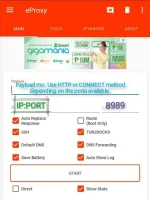
2. Punta ka dito para malagay natin ang ssh account na ginawa mo kanina
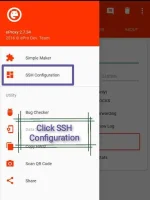
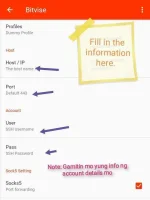
3. Sa part na to. Madaming nagkakamali pagdating sa Port. Do not use the default port. Use the port that was assign to account that you have made.
In my servers.. 550, 555 ang Dropbear Ports or yung Ssh ports. But you can also use the OpenSSH port 22.
4. You can also customize your DNS. Just enable that option and input your desired DNS method.
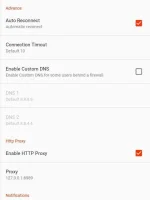
5. Last step. CLICK START and check the log if connected kana sa ginawa mo.
And that's it. Easy as 123

 . Enjoy. I'll Be waiting for your epro configs


 salamat sa sasagot