 PH
PH-
Welcome to PHCorner Forums! Sign up for free to unlock full access and exclusive privileges, including:
- Asking questions about computer and mobile issues
- Discovering internet tips for your mobile network and computer
You are using an out of date browser. It may not display this or other websites correctly.
You should upgrade or use an alternative browser.
You should upgrade or use an alternative browser.
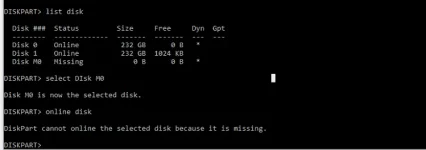
🔒 Closed Disk Partition - Status : Missing
- Thread starter zhilva
- Start date
- Status
- Not open for further replies.
arsenal1205
Rarely opens PHC
sana makatulong ito ts:
A dynamic disk may become Missing when it is corrupted, powered down, or disconnected.
I suggest you take the following steps to reactivate a dynamic disk by using a command line.
1. Open a command prompt and type diskpart.
2. At the DISKPART prompt, type list disk. Make note of the disk number of the missing or offline disk that you want to bring online. Missing disks are numbered M0, M1, M2, and so on, and offline disks are numbered 0, 1, 2, and so on.
3. At the DISKPART prompt, type select disk <disknumber>.
4. At the DISKPART prompt, type online.
In addition, you may convert the disk to basic and see how it helps.
For your reference:
You do not have permission to view the full content of this post. Log in or register now.
You do not have permission to view the full content of this post. Log in or register now.
sa tingin ko siguro nagawa mo na yung steps sa taas. Check mo yung sata or power cable ng HDD kung maayos ang pagkakabit sa HDD o sa MOBO.
A dynamic disk may become Missing when it is corrupted, powered down, or disconnected.
I suggest you take the following steps to reactivate a dynamic disk by using a command line.
1. Open a command prompt and type diskpart.
2. At the DISKPART prompt, type list disk. Make note of the disk number of the missing or offline disk that you want to bring online. Missing disks are numbered M0, M1, M2, and so on, and offline disks are numbered 0, 1, 2, and so on.
3. At the DISKPART prompt, type select disk <disknumber>.
4. At the DISKPART prompt, type online.
In addition, you may convert the disk to basic and see how it helps.
For your reference:
You do not have permission to view the full content of this post. Log in or register now.
You do not have permission to view the full content of this post. Log in or register now.
sa tingin ko siguro nagawa mo na yung steps sa taas. Check mo yung sata or power cable ng HDD kung maayos ang pagkakabit sa HDD o sa MOBO.
- Status
- Not open for further replies.
Similar threads
-
🖥️ PC App Macrorit Disk Partition Expert Version 5.3.4
- Started by sandoy
- Replies: 1
-
🖥️ PC App Ibeesoft Disk Partition Wizard 3.5.0 Multilingual
- Started by discuss3387
- Replies: 0
-
🖥️ PC App IBeesoft Disk Partition Wizard 3.5.0 (x64) Multilingual
- Started by discuss3387
- Replies: 0
-
🖥️ PC App Ibeesoft Disk Partition Wizard 3.5.0 Multilingual
- Started by discuss3387
- Replies: 0
-
🖥️ PC App IBeesoft Disk Partition Wizard 3.5.0 Multilingual
- Started by discuss3387
- Replies: 0
About this Thread
-
2Replies
-
448Views
-
2Participants
Last reply from:
zhilva
zhilva
New Topics
-
Dapat ba akong maalarma dito? Nagback-up na paunti-unti ako.
- Started by Jeii
- Replies: 0
- ❓ Computer Discussion & Support
-
Realtek audio missing in device manager
- Started by PHC-MERCURIAL
- Replies: 4
- ❓ Computer Discussion & Support
-
Suggest OS para sa budget pc yung lightweight.
- Started by YourR3ze
- Replies: 2
- ❓ Computer Discussion & Support
-
Microsoft copilot personal
- Started by WEIRJD
- Replies: 0
- ❓ Computer Discussion & Support
-
Lock profile or browser?
- Started by heyhey
- Replies: 7
- ❓ Computer Discussion & Support
-
Light/Gaming OS for 4 year old laptop
- Started by Genesis Storm
- Replies: 10
- ❓ Computer Discussion & Support
-
HWID SPOOFER HELP!
- Started by Balisain
- Replies: 0
- ❓ Computer Discussion & Support
-
LIGHTROOM APP PC
- Started by WHOOISDIYAAM
- Replies: 1
- ❓ Computer Discussion & Support
-
Active Directory tutorial
- Started by Allergies
- Replies: 1
- ❓ Computer Discussion & Support
-
Hide Yuzu or any emulator
- Started by izanagi07
- Replies: 1
- ❓ Computer Discussion & Support
Trending Topics
Online now
- Members online
- 439
- Guests online
- 1,998
- Total visitors
- 2,437