🔒 Closed PRO TIPS: Speed up chrome for android with this settings tweak.

Status
Not open for further replies.

Grapista

Grasshopper
Try nyu po..gumagana sa akin. Baka as inyo din.

Follow these steps:
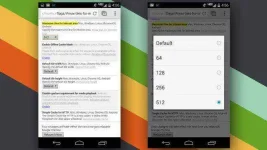
  1. Open the Chrome browser on your Android device
  2. In the address bar, type chrome://flags/#max-tiles-for-interest-area, and tap the Enter key
  3. Tap the drop-down for Maximum tiles for interest area
  4. Tap 512
  5. Tap the Relaunch Now button that appears at the bottom of the screen
  6. Thin tapos! Injoy..

oekgpokvtptku5oacoog.webp
 
Status
Not open for further replies.

About this Thread

  • 5
    Replies
  • 1K
    Views
  • 5
    Participants
Last reply from:
Blu08

Trending Topics

Online now

Members online
1,463
Guests online
1,254
Total visitors
2,717

Forum statistics

Threads
2,272,609
Posts
28,943,921
Members
1,237,271
Latest member
RNs
Back
Top