PH
PH
P
PurpleFox

FileOptimizer is a file compression tool used to reduce a variety of file types without changing the quality, also known as "lossless" compression. This is done via wide variety of optimization tools and recompression techniques combined into one program. Original files are sent to the recycle bin for restoration in the event the uncompressed version is preferred. Formats include audio/video (MP3, OGG, OGV), image (GIF, JPEG, PNG), office formats (DOCX, XLSX, ODT, PDF), and system files (DLL, EXE).
FileOptimizer is a lossless file size optimizer supporting BMP, DIB, DLL, BPL, DRV, LZL, SYS, CHM, CHS, CHW, DOC, DOT, FPX, MDB, MDT, MIX, MPD, MPP, MPT, MSI, MSP, MST, ONE, OST, PPS, PPT, PUB, PUZ STICKYNOTES, SNT THUMBS, DB, VSD, VST, VSS, XL, XLC, XLM, XLS, XLW, XSF, XSN, EXE, SCR, GIF, GZ, TGZ, SVGZ, JNG, JPG, JPEG, MNG, MP3, OBJ, O, LIB, A, OGG, OGV, EPDF, PDF, APNG, ICO, PNG, SWF, FAX, TIF, TIFF, PTIF, PTIFF, WEBP, AIR, APK, APPX, CBZ, DOCM, DOCX, DOTX, DOTM, DWFX, EPUB, IPA, JAR, MPP, ODT, OXPS, PPAM, POTM, POTX, PPSM, PPSX, PPTM, PPTX, PUB, SLDM, SLDX, VDX, VTX, VSX, XAP, XLAM, XLSM, XLSX, XLTM, XLTX, XPS, ZIP, AAI, AVS, DCX, PCC, PCX, FITS, JP2, JPC, HDR, HRZ, MIF, MIFF, MTV, OTB, P7, PALM, PDB, PBM, PCD, PCDS, PFM, PGM, PICON, PIC, PICT, PNM, PPM, PSB, PSD, SUN, VICAR, VIFF, WBMP, XBM, XPM, and XWD file formats among others.
It keeps the behaviour of the file untouched, but with its size reduced thanks to several recompression and optimization techniques.
- Simple program interface.
- Easy to use.
- Several third party tools integrated in one same tool (plugins).
- Easy automation via commandline.
Description:
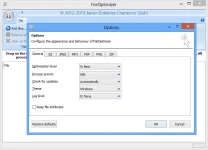
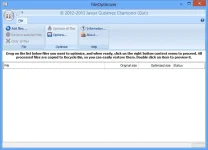
Drag the files you want to optimize to the files grid in FileOptimizer, right click with the mouse to open the contextual menu, and then click on Optimize. This will process all supported files added, and overwrite them with the optimized version.
Alternatively you can add the files and directories to process on the program's commandline, or dragging them to the executable file.
FileOptimizer will remove additional metadata, and other unneeded information, so if you want to further modify the original files, remember to create a backup of them.

- - Tested to be compatible on new Microsoft Windows 10.
- - Better PNG optimizations by allowing tunning TruePNG parameters, including remove metadata and lossy recompression.
- - Better JPEG optimizations by allowing to run jhead when metadata should be copied too (Jaff).
- - Do not convert SVG to SVGZ (JoeW).
- - Updated Leanify to 0.4.2.64 daily binaries.
- - Updated ImageMagick to 6.9.2.0 with HDRI support.
- - Updated gifsicle to 1.88 (custom build).
- - Updated TruePNG to 0.6.0.0.
- - Updated strip to 2.25.1.
- - Updated to NSIS 3.0 beta 2.
- - Updated custom builds with Visual C++ 2015 (gifsicle, jpegoptim, jsmin).
- - Upgraded distributions to 7-Zip 15.06.