 PH
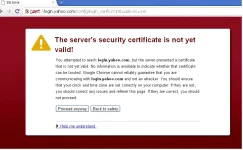
PHSome time you install fresh Operating system in your computer and then you install Browser, google chrome. After installation you try to open gmail, yahoo, or facebook in google chrome but you do not see your required page and see a message “Server Security Certificate is not yet valid”. Then you also try to open the page by clicking on “continue anyway” but the result is same.
Infect this problem occurs due to incorrect date and time of your computer. By synchronizing your system clock you can solve this problem.
I will tell you the best solution of this problem. Just follow these steps and after completion you will be able to login to facebook, yahoo, gmail etc.
Click on Start Menu and then control penal.
Open Date/Time setting
Adjust correct date and time according to your region.
Open "Internet Time Zone" tab.
Click on "Update Now" button. After clicking on button, It will start synchronzing your internet server timing.
After 7-8 seconds you will see a message, "The time has been successfully synchronized with time.windows.com on 07-07-2013 at 5:09PM.
Done
Now try to open facebook, yahoo or gmail in google chrome again. Surely you will login successfully.
Infect this problem occurs due to incorrect date and time of your computer. By synchronizing your system clock you can solve this problem.
I will tell you the best solution of this problem. Just follow these steps and after completion you will be able to login to facebook, yahoo, gmail etc.
Click on Start Menu and then control penal.
Open Date/Time setting
Adjust correct date and time according to your region.
Open "Internet Time Zone" tab.
Click on "Update Now" button. After clicking on button, It will start synchronzing your internet server timing.
After 7-8 seconds you will see a message, "The time has been successfully synchronized with time.windows.com on 07-07-2013 at 5:09PM.
Done
Now try to open facebook, yahoo or gmail in google chrome again. Surely you will login successfully.