PH
PHDownload HD Wallpapers (PC & Phone)
Heywazup, I'm gonna share you this awesome website which you can download HD wallpapers. It also have a feature where it can assess your device's resolution.This is applicable for both mobile and desktop.
PC Look:

Mobile Look:

Here's the link:
- You do not have permission to view the full content of this post. Log in or register now.
Detailed Tutorial Below[Only for beginners]:
For PC/Laptop/Desktop users:
Step 1: Go to the site and either scroll down to find wallpapers or search in the search bar for your desired wallpaper.
Step 2: After choosing your desired wallpaper. You can see at the right upper corner your device's resolution. In my case, its 1366x768px

If you want to download higher resolution, just scroll down and you will find "Choose resolution & download this wallpaper"

In my case, I'll just choose resolution. [1920x1080px]
Here are available resolutions you can download and I'm going to download the 1920x1080
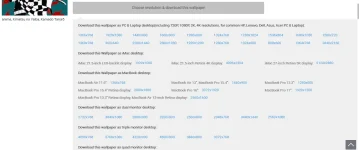
After choosing your desired wallpaper. You can now download it

For Phone/Mobile Users:
Step 1: Go to the website, link above. You can either scroll down to look for wallpapers or search it up in the search bar to look for your desired wallpaper.
In my case, I'm going to pick this anime wallpaper

Step 2: In the above description, I already said that this wallpaper can know what resolution in your device. Just scroll down and you can see it.

Step 3: Just click "Download for current screen: 480x855px"

Step 4: Just wait the wallpaper to load
Step 5: You now can download the wallpaper based on the device's screen

Results:
PC
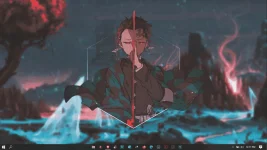
Mobile: