 PH
PHThe Catnonymous
Fanatic
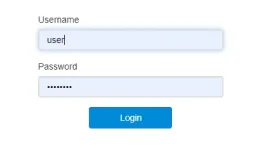
Step 1. Login to your router using basic user and password
Step 2: Go to Device Settings>Advance Settings
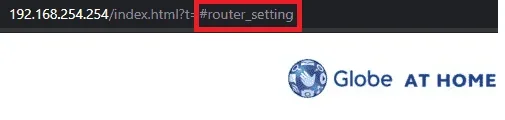
Step 3: In your browser address bar, replace #router_setting with the following below
#mcc_mnc_locking - openline (kung gusto mong i-open line router mo)
#frequency - band selection/ frequency (kung gusto mo magbago ng band frequency)
OTHER KEYS:
#unlock - input network unlock code
#nat - enable/disable NAT
#flow_setting - data limit access
#apn_setting - apn setting
#system_upgrade - firmware update/upgrade
#net_select - 4G/LTE , 3G/HSTP, 2G/EDGE
#net_lockpci - Cell ID Locking
#ussd - USSD Dialer (Works on 3G Connection Only)
#l2tp - Virtual Private Network
Disclaimer: Changing your router settings will void your warranty.
Step 2: Go to Device Settings>Advance Settings
Step 3: In your browser address bar, replace #router_setting with the following below
#mcc_mnc_locking - openline (kung gusto mong i-open line router mo)
#frequency - band selection/ frequency (kung gusto mo magbago ng band frequency)
OTHER KEYS:
#unlock - input network unlock code
#nat - enable/disable NAT
#flow_setting - data limit access
#apn_setting - apn setting
#system_upgrade - firmware update/upgrade
#net_select - 4G/LTE , 3G/HSTP, 2G/EDGE
#net_lockpci - Cell ID Locking
#ussd - USSD Dialer (Works on 3G Connection Only)
#l2tp - Virtual Private Network
Disclaimer: Changing your router settings will void your warranty.