PH
PHShareYourBlessings
Journeyman
I will teach you on how to remove lag in both OS Win7/10 by following these steps. (Own ways)
1. Go to control panel then look for services and run it as admin.
2. Disable these services
" Background interlligent service "
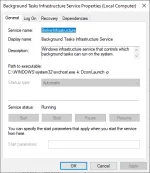
" Background task infrastructure service "
" Google chrome service ( there are 2 so disable those ) "
" Printer spooler ( if you don't have printer/s ) "
" Superfetch or Sysmain (new name) "
" Windows update "
3. Go to control panel again look for services>administrative tools>task scheduler and run it as admin.
4. Click task scheduler library>microsoft>windows>windows update> disable then delete the pending updates except " sihpostreboot "
5. Type this in run window and clear those trash/cache files
" temp "
" prefetch "
" %temp% "
and restart your PC.
See the effect after rebooting.
For more tutorials, tips & tricks just follow me for more topics!
1. Go to control panel then look for services and run it as admin.
2. Disable these services
" Background interlligent service "
" Background task infrastructure service "
" Google chrome service ( there are 2 so disable those ) "
" Printer spooler ( if you don't have printer/s ) "
" Superfetch or Sysmain (new name) "
" Windows update "
3. Go to control panel again look for services>administrative tools>task scheduler and run it as admin.
4. Click task scheduler library>microsoft>windows>windows update> disable then delete the pending updates except " sihpostreboot "
5. Type this in run window and clear those trash/cache files
" temp "
" prefetch "
" %temp% "
and restart your PC.
See the effect after rebooting.
For more tutorials, tips & tricks just follow me for more topics!