 PH
PHDEEP FREEZE STANDARD v. 8.53

*Supported Windows 10, 8.1 and 7
Download Here:
You do not have permission to view the full content of this post. Log in or register now.
if you have a question, kindly leave a comment. thank you

*Supported Windows 10, 8.1 and 7
FULL VERSION/LIFETIME licenseDownload Here:
You do not have permission to view the full content of this post. Log in or register now.
HOW TO INSTALL DEEP FREEZE |
|---|
| Download and Extract the FILES First.. 1. Locate and open the Extracted Folder and Install DFStd.exe 2. Install (click NEXT) 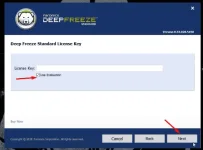 3.Automatically the Drive C: Will frozen, Click Next 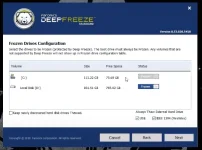 4. Click INSTALL 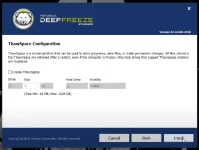 5. When INSTALLATION is DONE, your PC will reboot AUTOMATICALLY. 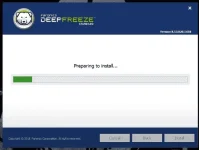 6. after REBOOTING, this will appear in your screen. You are about to choose, wether you change password or not choose NO if you not change password 6.1 (if YES click YES) 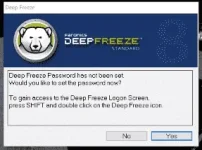 6.2 Enter your PASSWORD 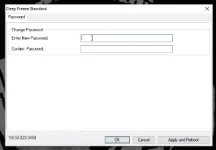 After changing password, click OK TO OPEN DEEP FREEZE STANDARD, press CTRL+SHIFT+ALT+F6 or click the system tray, click DEEP FREEZE ICON then hold SHIFT + LMB then ENTER YOUR PASSWORD |
HOW TO ACTIVATED |
|---|
1. as you can see, DEEP FREEZE STANDARD is NOT ACTIVATED yet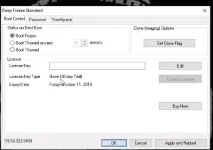 to make changes, click BOOT THAWED then click APPLY and REBOOT after clicking Apply and reboot, Your PC may automatically restarted *FROZEN - FROZEN STATE **THAWED - unfreeze 2. press WINDOWS + R then TYPE services.msc find DFServ then CLICK STOP, then Right Click > press Properties > Choose Disable then OK 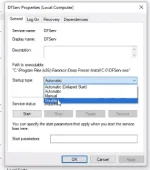 RESTART YOUR COMPUTER 3. Located the Files that you've Extracted, then Click CRACK 4. Extract the "dfs.v8.53.020.5458-patchdfs" then run the dfs.v8.53.020.5458-ρá†ch.exe (run as adm) 5. Uncheck the MAKE BACKUP 6. Click Patch (cannot find the file. Search the File?) Click yes 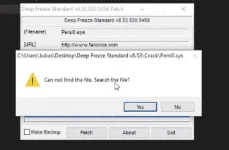 7. Go to Drive C: and click the Persi0.sys and click OPEN THE PATCHING SHOULD BE SUCCESSFUL View attachment 1004336 The Click EXIT 8. Go to service.msc then find DFServ , Right Click > press Properties > Choose AUTOMATIC then OK restart YOUR PC.. DONE |
if you have a question, kindly leave a comment. thank you
Spoiler contents are visible only to Established Members.

