H Haarp Machine Elite Oct 27, 2020 #1 mga mahal baka meron kayong microsoft 365 jan huhuhu pahelp naman thanks po
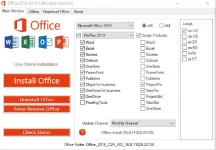
C Chuckedoll 🅝🅞 🅢🅣🅡🅘🅝🅖🅢 🅐🅣🅣🅐🅒🅗🅔🅓 Oct 28, 2020 #4 You do not have permission to view the full content of this post. Log in or register now. You do not have permission to view the full content of this post. Log in or register now. Password You do not have permission to view the full content of this post. Log in or register now. ac†ïvâ†ør will be posted shortly WINDOWS 10 Installation guide - ISO file must be opened by virtual drive with Daemoon Tools software or extracted and installed by WinRAR software. Select the desired language and product according to the screen shot and install the software. You need the Retail Version to Volume License to enable it So, after installing Office, go to Utilities tab and run Convert . Then click Activation key to activate. (Activate online) Enjoy Office. Attention: Available in the final version and RTM. The Pro Plus version is the most complete version. Uninstall old versions completely before installing new version. Installing the application is completely offline and does not require an internet connection. You need Microsoft Visual C software to install Office 2019. This version includes Project Pro and Vision Pro software. Attachments Actïvâtôr.txt Actïvâtôr.txt 129 bytes · Views: 8 Oct 28, 2020
You do not have permission to view the full content of this post. Log in or register now. You do not have permission to view the full content of this post. Log in or register now. Password You do not have permission to view the full content of this post. Log in or register now. ac†ïvâ†ør will be posted shortly WINDOWS 10 Installation guide - ISO file must be opened by virtual drive with Daemoon Tools software or extracted and installed by WinRAR software. Select the desired language and product according to the screen shot and install the software. You need the Retail Version to Volume License to enable it So, after installing Office, go to Utilities tab and run Convert . Then click Activation key to activate. (Activate online) Enjoy Office. Attention: Available in the final version and RTM. The Pro Plus version is the most complete version. Uninstall old versions completely before installing new version. Installing the application is completely offline and does not require an internet connection. You need Microsoft Visual C software to install Office 2019. This version includes Project Pro and Vision Pro software.
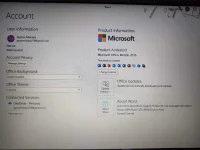
Y Yameteee Eternal Poster Feb 7, 2021 #6 Boss okay na ba to? Hindi ko alam kung nasundan ko steps eh. Ayos na po ba to? Wala po ba virus? Sa bagong laptop ko po kasi ininstall eh. Yung pc po namin navirusan kasi nagkaransomware eto po ba safe? wala po kasi ako ganong alam sa mga ganto
Boss okay na ba to? Hindi ko alam kung nasundan ko steps eh. Ayos na po ba to? Wala po ba virus? Sa bagong laptop ko po kasi ininstall eh. Yung pc po namin navirusan kasi nagkaransomware eto po ba safe? wala po kasi ako ganong alam sa mga ganto
 PH
PH