 PH
PHGandang morning eto update ko Kasi di ako makatulog
Update muna ako Kasi di ako makatulog
Download open VPN Account here
Vpngate.com
Convert IP to DNS here
Packetcp.com
Download this two (2) application
Open Vpn
You do not have permission to view the full content of this post. Log in or register now.
Quick Edit+
You do not have permission to view the full content of this post. Log in or register now.
After that do the FF:
1. Open File manager and Rename the ovpn profile you download
2. Open the quick edit and import the ovpn profile you Download
3. Copy the remote proxy in #62 and convert it into DNS using this site
Packetcp.com
After you convert the remote proxy to DNS just copy it to #62 (change the remote proxy with your created DNS)
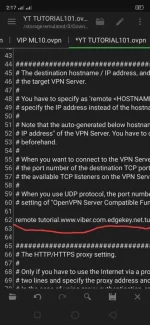
4. Scroll down and delete the space between #s 103-105
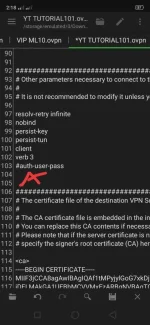
5. If you already converted the IP to DNS just copy and paste it between <cert/key> in #183
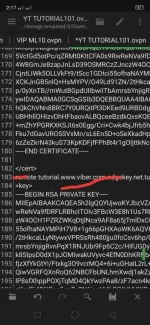
6. Click Save!!!
7 Import your created profile to ovpn app and try to connect...
Feedback is a must
Follow me for more updates
#KimJaiNgPinas
eto update ko Kasi di ako makatulog Update muna ako Kasi di ako makatulog
Download open VPN Account here
Vpngate.com
Convert IP to DNS here
Packetcp.com
Download this two (2) application
Open Vpn
You do not have permission to view the full content of this post. Log in or register now.
Quick Edit+
You do not have permission to view the full content of this post. Log in or register now.
After that do the FF:
1. Open File manager and Rename the ovpn profile you download
2. Open the quick edit and import the ovpn profile you Download
3. Copy the remote proxy in #62 and convert it into DNS using this site
Packetcp.com
After you convert the remote proxy to DNS just copy it to #62 (change the remote proxy with your created DNS)
4. Scroll down and delete the space between #s 103-105
5. If you already converted the IP to DNS just copy and paste it between <cert/key> in #183
6. Click Save!!!
7 Import your created profile to ovpn app and try to connect...
Feedback is a must
Follow me for more updates
#KimJaiNgPinas

