 PH
PH1min. buga ng internet connection gawin nating unli & stable!
✔Now Good for Movies like Netflix
✔Youtube(360p) para may allowance kapag mag rereconnect vpn hindi mag buffering same sa movies.
✔Browse
✔Upload
✔Download
Tips to Download:
1. Click "FREE DOWNLOAD"
2. Wait 30 seconds(need to wait for this)
3. Answer Captcha I'm not a robot then Click "CREATE DOWNLOAD LINK" then (TAP BACK kapag may lumitaw ads/ibang site then click mo lang ulit).
4. Last, Click "CLICK HERE TO DOWNLOAD" then (TAP BACK kapag may lumitaw ads/ibang site then wait).
(Back mo lang kapag nalitaw ibang site or ads)
DOWNLOAD THESE 4 FIRST AND INSTALL:
USE THIS ktr file NOLOAD Easy Connect Fast Payload:
- CHECK MY LATEST NOLOAD CONFIGS THREAD PARA SA NEW ktr file config
FOLLOW MO AKO PARA UPDATED KA SA CONFIGS
DECEMBER 16, LATEST UPDATE:
https://phcorner.org/threads/easy-connect-na-noload-configs-nandito-na-sks-ktr-ehi-asht.995362/
2. MACRODROID Apk:
3.
4. KPN Tunnel Rev[if wala kapa nito]:
You do not have permission to view the full content of this post. Log in or register now.
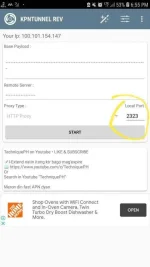
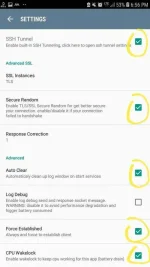
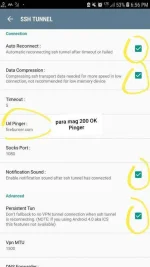
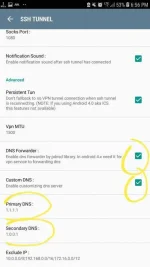
1. AFTER INSTALLING. . . IMPORT ktr file to KPN Tunnel Rev VPN and setup the setting [see img].
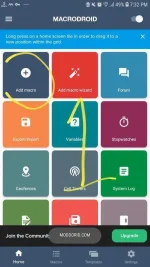
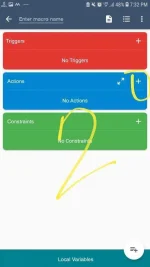
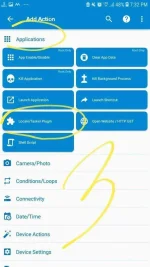
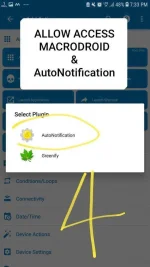
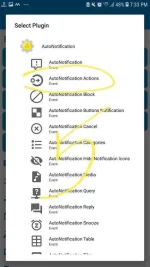
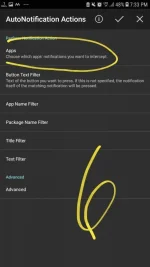
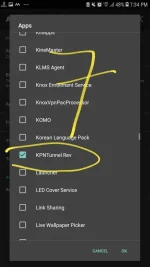
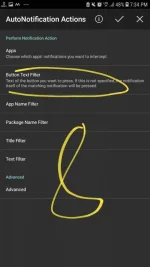
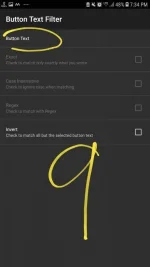
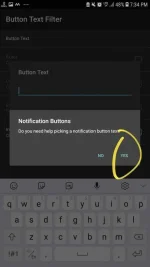
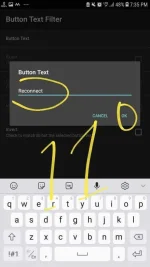
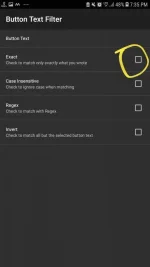
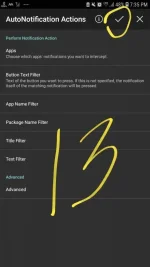
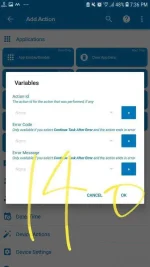
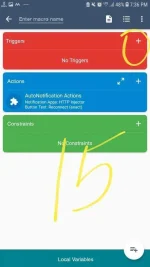
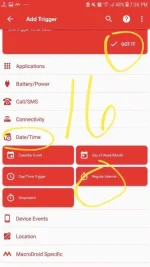
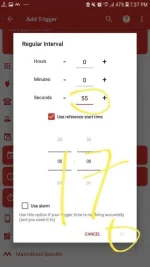
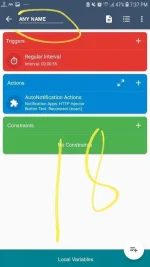
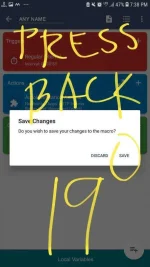
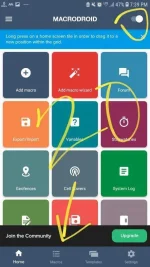
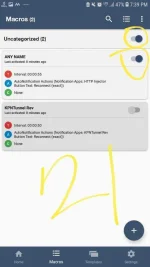
2. Setup MACRODROID Just follow carefull my screenshots step by step. . . [make sure you allow access both MacroDroid & AutoNotification].
3. Start KPN Tunnel Rev Until it`s Connected.
4. It's All Done! [KPN Tunnel Rev will automatic reconnect using MacroDroid every 55seconds].
✔Now Good for Movies like Netflix
✔Youtube(360p) para may allowance kapag mag rereconnect vpn hindi mag buffering same sa movies.
✔Browse
✔Upload
✔Download
Tips to Download:
1. Click "FREE DOWNLOAD"
2. Wait 30 seconds(need to wait for this)
3. Answer Captcha I'm not a robot then Click "CREATE DOWNLOAD LINK" then (TAP BACK kapag may lumitaw ads/ibang site then click mo lang ulit).
4. Last, Click "CLICK HERE TO DOWNLOAD" then (TAP BACK kapag may lumitaw ads/ibang site then wait).
(Back mo lang kapag nalitaw ibang site or ads)
DOWNLOAD THESE 4 FIRST AND INSTALL:
USE THIS ktr file NOLOAD Easy Connect Fast Payload:
| You do not have permission to view the full content of this post. Log in or register now. |
FOLLOW MO AKO PARA UPDATED KA SA CONFIGS
DECEMBER 16, LATEST UPDATE:
https://phcorner.org/threads/easy-connect-na-noload-configs-nandito-na-sks-ktr-ehi-asht.995362/
2. MACRODROID Apk:
|
3.
| AutoNotification-4.1.4.apk | You do not have permission to view the full content of this post. Log in or register now. |
4. KPN Tunnel Rev[if wala kapa nito]:
You do not have permission to view the full content of this post. Log in or register now.
1. AFTER INSTALLING. . . IMPORT ktr file to KPN Tunnel Rev VPN and setup the setting [see img].
2. Setup MACRODROID Just follow carefull my screenshots step by step. . . [make sure you allow access both MacroDroid & AutoNotification].
3. Start KPN Tunnel Rev Until it`s Connected.
4. It's All Done! [KPN Tunnel Rev will automatic reconnect using MacroDroid every 55seconds].
Spoiler contents are visible only to Established Members.
Attachments
-
 Screenshot_20201019-193230_MacroDroid.webp50.9 KB · Views: 23
 -
 Screenshot_20201019-193249_MacroDroid.webp26.6 KB · Views: 18
 -
 Screenshot_20201019-193308_MacroDroid.webp52.7 KB · Views: 15
 -
 20201019_195655.webp45.5 KB · Views: 17
 -
 Screenshot_20201019-193336_MacroDroid.webp51.4 KB · Views: 16
 -
 Screenshot_20201019-193349_AutoNotification.webp42.3 KB · Views: 17
 -
 Screenshot_20201019-193411_AutoNotification.webp36.7 KB · Views: 17
 -
 Screenshot_20201019-193440_AutoNotification.webp43.3 KB · Views: 17
 -
 Screenshot_20201019-193453_AutoNotification.webp27.8 KB · Views: 17
 -
 Screenshot_20201019-193506_AutoNotification.webp32.3 KB · Views: 18
 -
 Screenshot_20201019-193525_AutoNotification.webp41.8 KB · Views: 16
 -
 Screenshot_20201019-193538_AutoNotification.webp25 KB · Views: 15
 -
 Screenshot_20201019-193606_AutoNotification.webp42.6 KB · Views: 16
 -
 Screenshot_20201019-193625_MacroDroid.webp42.2 KB · Views: 15
 -
 Screenshot_20201019-193646_MacroDroid.webp33.2 KB · Views: 22
 -
 Screenshot_20201019-193703_MacroDroid.webp43.8 KB · Views: 14
 -
 Screenshot_20201019-193722_MacroDroid.webp36.4 KB · Views: 15
 -
 Screenshot_20201019-193809_MacroDroid.webp36.2 KB · Views: 13
 -
 Screenshot_20201019-193838_MacroDroid.webp52.5 KB · Views: 17
 -
 Screenshot_20201019-193914_MacroDroid.webp56.3 KB · Views: 18
 -
 Screenshot_20201019-193931_MacroDroid.webp42.7 KB · Views: 18
 -
 Screenshot_20201019-185555_KPNTunnel Rev.webp40.2 KB · Views: 15
 -
 Screenshot_20201019-185621_KPNTunnel Rev.webp50.5 KB · Views: 17
 -
 20201019_195521.webp49.7 KB · Views: 14
 -
 Screenshot_20201019-185709_KPNTunnel Rev.webp45.3 KB · Views: 18