 PH
PHok guys wala ng intro intro..
download the Huawei WebUI here : You do not have permission to view the full content of this post. Log in or register now.
then after you download it, open the RAR file.
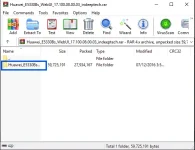
double click Huawei_E5330Bs..
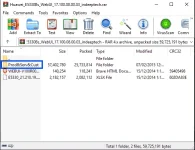
double click Prod&Serv&Cust
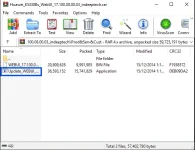
double click Update_WEBUI_ to run the program
NOTE: Open your Pocket Wifi/Modem, plug in or connect it to your computer before clicking the START.
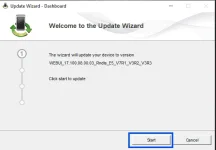
wait until the process is finish.. then click FINISH.
then go to your browser and type 192.168.8.1
username: admin
password: admin
Disclaimer: working sya sa akin.. hopefully magwork din sa inyo. Keep safe and God bless!
Credit sa owner ng link.
FEED BACK kung nakatulong sa inyo.. thanks!
download the Huawei WebUI here : You do not have permission to view the full content of this post. Log in or register now.
then after you download it, open the RAR file.
double click Huawei_E5330Bs..
double click Prod&Serv&Cust
double click Update_WEBUI_ to run the program
NOTE: Open your Pocket Wifi/Modem, plug in or connect it to your computer before clicking the START.
wait until the process is finish.. then click FINISH.
then go to your browser and type 192.168.8.1
username: admin
password: admin
Disclaimer: working sya sa akin.. hopefully magwork din sa inyo. Keep safe and God bless!
Credit sa owner ng link.
FEED BACK kung nakatulong sa inyo.. thanks!