
🔒 Closed Imbatch 4.0.0

  • Thread starter Thread starter PurpleFox
  • Start date Start date
Status
Not open for further replies.
P

PurpleFox

MkYZFR6.webp
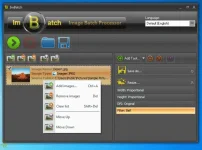
ImBatch is a FREE batch image processing tool for Windows. ImBatch features an excellent user interface that’s easy to use and understand and can convert, resize, rotate and carry out other operations on lots of images in a single operation.

Batch Tasks List
What makes this tool different from other batch image processors is its “Task Structure”. You can combine Tasks to make a processing sequence that will give you exactly what you want. ImBatch offers many imaging functions (Tasks) like converting, resizing or applying watermark. You can change the order of tasks, add some tasks twice or more (for example, to convert images to JPEG and PNG in one go), turn off/on tasks to exclude/include them from the task processing list, hide some task parameters, leaving only the necessary ones. Also you can undo/redo all changes made in Task List.

File Size | 12.8 Mb
JEsRTBa.webp
imbatch-03-700x524.png


You do not have permission to view the full content of this post. Log in or register now.
 
Status
Not open for further replies.

About this Thread

  • 7
    Replies
  • 260
    Views
  • 5
    Participants
Last reply from:
Unknown user

Trending Topics

Online now

Members online
924
Guests online
2,948
Total visitors
3,872

Forum statistics

Threads
2,294,142
Posts
29,089,038
Members
1,208,099
Latest member
dewa09
Back
Top