 PH
PH
D
Deleted member 1761594
Share ko lang mga idol yun simple guide pra enable yun ransomware protection sa windows 10
tested ko ito gamit bago ng windows 10 version:2004
Para ma protect yun mga important files nyo kung sakali ma attack.
mga nasa loob nun ni assigned hindi basta basta ma encrypt ng ransomware
PERO SYEMPRE MAS OK PADIN MAY BACKUP KAYO SA IBA COMPUTER OR HDD LALO IMPORTANT FILES.
(Like or Love to open mga idol)
Step 1. Open Windows Settings
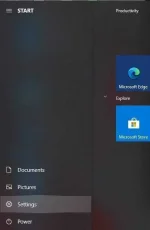
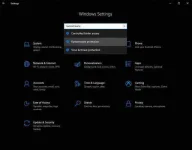
Step 2. In text box type Ransomware and open Ransomware protection
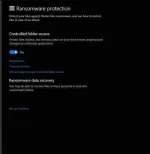
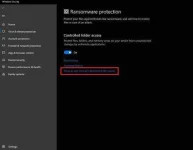
Step 3. Slide the button to turn on the Ransomware protection
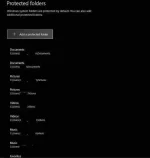
By default windows users are protected, but we can also add additional folders.
If controlled folder access has blocked an app you trust, we can add it as an allowed app. This allows the app to make changes to protected folders.
Salamat mga idol
tested ko ito gamit bago ng windows 10 version:2004
Para ma protect yun mga important files nyo kung sakali ma attack.
mga nasa loob nun ni assigned hindi basta basta ma encrypt ng ransomware
PERO SYEMPRE MAS OK PADIN MAY BACKUP KAYO SA IBA COMPUTER OR HDD LALO IMPORTANT FILES.
(Like or Love to open mga idol)
Step 1. Open Windows Settings
Step 2. In text box type Ransomware and open Ransomware protection
Step 3. Slide the button to turn on the Ransomware protection
By default windows users are protected, but we can also add additional folders.
If controlled folder access has blocked an app you trust, we can add it as an allowed app. This allows the app to make changes to protected folders.
Salamat mga idol


