 PH
PHNOTE: This version of the plugin is currently deprecated and should not be used with OBS Studio v25. Please use You do not have permission to view the full content of this post.
Log in or register now. version instead
1. Download and install OBS Studio v24.0.3 You do not have permission to view the full content of this post. Log in or register now..
2. Download and Install Visual Studio both x86 and x64 You do not have permission to view the full content of this post. Log in or register now. to prevent issues.
3. Download and install You do not have permission to view the full content of this post. Log in or register now. by catxfish add-on You do not have permission to view the full content of this post. Log in or register now..
How to use:
Output:
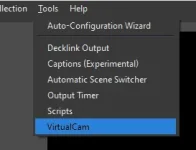
1. Selecting Tools -> VirtualCam
2. Press start button and close dialog
3. Open your 3rd party program and choose "OBS-Camera" as a Video input
FAQ:
Is it necessary to install 32bit version?
Yes, there are still many 3rd party programs use 32bit directshow interface for the reason of compatibility.
Why resolution and framerate are not same as OBS output Setting?
If you open OBS and Start Virtual Output before using your 3rd party software, the virtual webcam will set the obs setting as a default setting .Otherwise the default setting of virtual webcam will be 1920x1080 @ 30fps
Is it possible to output with portrait resolution (like 1080x1920) ?
It depends on your 3rd party software , it might reject recommended resolution.
If your software is compatible , you just need to set the obs output setting to the resolution you want.
How to prevent the drop frame issue?
Maybe your PC is too busy ,try to set more buffer.
Is there a virtual microphone ?
This plugin provide a directshow audio source which can't be recognized as microphone , only some programs like VLC can use it.
By using OBS VirtualCam, you can apply more effects to your camera such as greenscreen, color correction, and more.
1. Download and install OBS Studio v24.0.3 You do not have permission to view the full content of this post. Log in or register now..
2. Download and Install Visual Studio both x86 and x64 You do not have permission to view the full content of this post. Log in or register now. to prevent issues.
3. Download and install You do not have permission to view the full content of this post. Log in or register now. by catxfish add-on You do not have permission to view the full content of this post. Log in or register now..
How to use:
Output:
1. Selecting Tools -> VirtualCam
2. Press start button and close dialog
3. Open your 3rd party program and choose "OBS-Camera" as a Video input
FAQ:
Is it necessary to install 32bit version?
Yes, there are still many 3rd party programs use 32bit directshow interface for the reason of compatibility.
Why resolution and framerate are not same as OBS output Setting?
If you open OBS and Start Virtual Output before using your 3rd party software, the virtual webcam will set the obs setting as a default setting .Otherwise the default setting of virtual webcam will be 1920x1080 @ 30fps
Is it possible to output with portrait resolution (like 1080x1920) ?
It depends on your 3rd party software , it might reject recommended resolution.
If your software is compatible , you just need to set the obs output setting to the resolution you want.
How to prevent the drop frame issue?
Maybe your PC is too busy ,try to set more buffer.
Is there a virtual microphone ?
This plugin provide a directshow audio source which can't be recognized as microphone , only some programs like VLC can use it.
By using OBS VirtualCam, you can apply more effects to your camera such as greenscreen, color correction, and more.