 PH
PHPHC-AlbertzZ
Forum Veteran
*Note: Try at your own risk....
Requirements:
-An Android Phone Syempre
-A rooted with Magisk (Important)
-SELinux set to "Permissive"
Steps:
Open your Magisk.
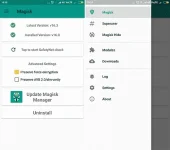
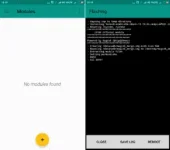
Option 1: Choose the Modules option, and By Going through the Modules Section you can see the Plus Yellow Button.
Download Link for Module: You do not have permission to view the full content of this post. Log in or register now.
-Tap on Plus Yellow button and Choose the Viper4Android FX Magisk Module from the Storage.

-It will take less than a minute to complete the flashing.
-Finally don't reboot exit then open Viper4Android app setup then will ask you to grant root they automatically reboot.
=====================================================================================
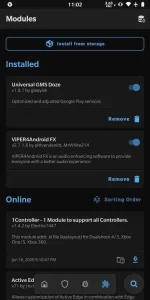
Option 2: Choose the Download Section. Tap on the Search bar. Type (Viper4Android FX) Android then you will see the Search results.
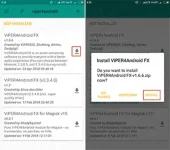
-Click on Download Symbol then it will ask you to direct install.
-Flashing will start automatically.
-Finally don't reboot exit then open Viper4Android app setup then will ask you to grant root they automatically reboot.
=====================================================================================
You need to download this for sound effect Present.
Present: You do not have permission to view the full content of this post. Log in or register now. (Base on my device this Present is good)
IRS FILES: You do not have permission to view the full content of this post. Log in or register now.
=====================================================================================
Setup Viper4Android:
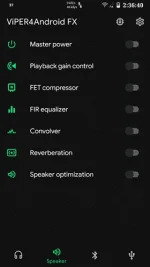
-Open your Viper4Android App.
-Open your Any File manager also extract the Present and IRS files.
-Copy Present files into internal storage < Viper4Android folder and Internal Storage < Android < data < com.pittvandewitt.viperfx < files folder.(Both kase para sure na makita)
-Copy all irs files into internal storage < Viper4Android < kernel folder and Internal Storage < Android < data < com.pittvandewitt.viperfx < files < kernel folder.(Both kase para sure na makita)
-Open ulit Viper4Android App.

Make sure na makikita ninyo yung present: just click the icon speaker to view.
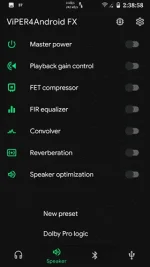
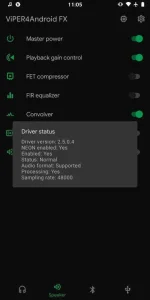
Click the present then load to automatically setup the setting. Ganun din sa Headset/earphone at Bluetooth speaker/headphone/earphone just go to there tab.
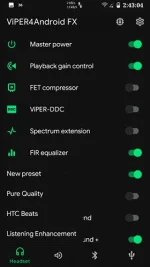
Kung gusto ninyo nmn isetup base sa type ninyo just adjust the some setting.
To load nmn ng mga IRS files just go to Convolver then choose your prefer irs.
GOODLUCK ka PHC.
pang maintain lng for established and Elite hihihi


Requirements:
-An Android Phone Syempre
-A rooted with Magisk (Important)
-SELinux set to "Permissive"
Steps:
Open your Magisk.
Option 1: Choose the Modules option, and By Going through the Modules Section you can see the Plus Yellow Button.
Download Link for Module: You do not have permission to view the full content of this post. Log in or register now.
-Tap on Plus Yellow button and Choose the Viper4Android FX Magisk Module from the Storage.
-It will take less than a minute to complete the flashing.
-Finally don't reboot exit then open Viper4Android app setup then will ask you to grant root they automatically reboot.
=====================================================================================
Option 2: Choose the Download Section. Tap on the Search bar. Type (Viper4Android FX) Android then you will see the Search results.
-Click on Download Symbol then it will ask you to direct install.
-Flashing will start automatically.
-Finally don't reboot exit then open Viper4Android app setup then will ask you to grant root they automatically reboot.
=====================================================================================
You need to download this for sound effect Present.
Present: You do not have permission to view the full content of this post. Log in or register now. (Base on my device this Present is good)
IRS FILES: You do not have permission to view the full content of this post. Log in or register now.
=====================================================================================
Setup Viper4Android:
-Open your Viper4Android App.
-Open your Any File manager also extract the Present and IRS files.
-Copy Present files into internal storage < Viper4Android folder and Internal Storage < Android < data < com.pittvandewitt.viperfx < files folder.(Both kase para sure na makita)
-Copy all irs files into internal storage < Viper4Android < kernel folder and Internal Storage < Android < data < com.pittvandewitt.viperfx < files < kernel folder.(Both kase para sure na makita)
-Open ulit Viper4Android App.
Make sure na makikita ninyo yung present: just click the icon speaker to view.
Click the present then load to automatically setup the setting. Ganun din sa Headset/earphone at Bluetooth speaker/headphone/earphone just go to there tab.
Kung gusto ninyo nmn isetup base sa type ninyo just adjust the some setting.
To load nmn ng mga IRS files just go to Convolver then choose your prefer irs.
GOODLUCK ka PHC.
pang maintain lng for established and Elite hihihi


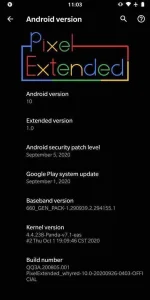
 naka miui 12 kase ako