PH
PH- Extract firmware images (bulk)
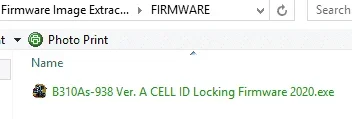
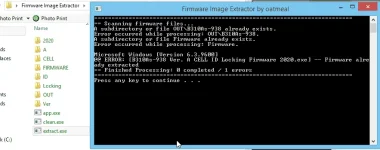
- To extract firmware images put firmware inside FIRMWARE folder then run extract.exe
- To clean output(delete extracted images) run clean.exe
Video Tutorial
View attachment firmware image extractor.mp4
Download:
You do not have permission to view the full content of this post. Log in or register now.
Other Huawei tools:
- [PC] EARFCN-Frequency Calculator (for CID Locking)
- Huawei Managers for Android & Windows PC
- Update Wizard Firmware Installer [EN] (Translated to English by oatmeal)
- Balong Flash & UsbDownload [EN] (Translated to English by oatmeal)
- To extract firmware images put firmware inside FIRMWARE folder then run extract.exe
- To clean output(delete extracted images) run clean.exe
Video Tutorial
View attachment firmware image extractor.mp4
Download:
You do not have permission to view the full content of this post. Log in or register now.
Spoiler contents are visible only to Established Members.
Other Huawei tools:
- [PC] EARFCN-Frequency Calculator (for CID Locking)
- Huawei Managers for Android & Windows PC
- Update Wizard Firmware Installer [EN] (Translated to English by oatmeal)
- Balong Flash & UsbDownload [EN] (Translated to English by oatmeal)