 PH
PH1. Go to You do not have permission to view the full content of this post.
Log in or register now.
2. Login with Microsoft using your OneDrive account
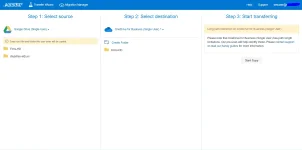
3. In the select source choose Google Drive (Single User) and input your username and password ~ now select the folder you want to backup
4. In the select destination choose OneDrive for Business (Single User) and input your username and password ~ now select the folder you want to place your backup
5. Then "Click" Start Copy
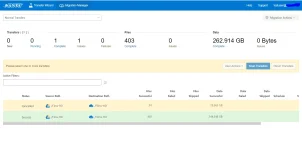
Note: You can also close the mover.io tab to your browser and use your computer in your normal way it will not cancel the backup.
For OneDrive 5Tb account you can buy here: You do not have permission to view the full content of this post. Log in or register now.
Some screenshots:
2. Login with Microsoft using your OneDrive account
3. In the select source choose Google Drive (Single User) and input your username and password ~ now select the folder you want to backup
4. In the select destination choose OneDrive for Business (Single User) and input your username and password ~ now select the folder you want to place your backup
5. Then "Click" Start Copy
Note: You can also close the mover.io tab to your browser and use your computer in your normal way it will not cancel the backup.
For OneDrive 5Tb account you can buy here: You do not have permission to view the full content of this post. Log in or register now.
Some screenshots: