 PH
PHPHC-AlbertzZ
Forum Veteran
Share ko lang tong napaka-Usefull na applications for windows 10. at NoAds pati kaya ayos na ayos.
Basic process lang yan, explore ninyo na lang.
Reply na lang kung may katanungan kayo.

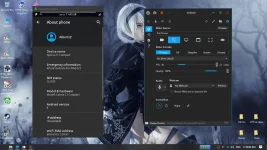
Scrcpy
This application provides display and control of Android devices connected on USB (or You do not have permission to view the full content of this post. Log in or register now.).
It does not require any root access. It works on GNU/Linux, Windows and macOS.
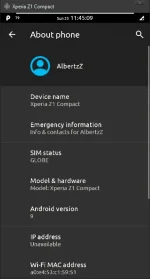
It focuses on:
*The Android device requires at least API 21 up (Android 5.0).
*Make sure you enabled adb debugging on your device(s).
On some devices, you also need to enable You do not have permission to view the full content of this post. Log in or register now. to control it using keyboard and mouse.
Scrcpy Software Direct Link: You do not have permission to view the full content of this post. Log in or register now.
For more info visit this site:
You do not have permission to view the full content of this post. Log in or register now.
=====================================================================================
Screen Recorder Pro (Win10App/Microsoft Store)
Screen Recorder Pro can capture Screen, Webcam, Audio, Cursor.
With this powerful tool, you can record anything on the screen including selected
areas, applications, active windows, and more.
Features:
-Take ScreenShots
-Capture ScreenCasts (Avi/Gif/Mp4)
-Capture with/without Mouse Cursor
-Capture Specific Regions, Screens or Windows
-Capture Mouse Clicks or Keystrokes
-Mix Audio recorded from Microphone and Speaker Output
-Capture from Webcam.
Please Note:
- It is best to have some recording time for each recording, for example, more than 3
seconds.
- It is best to have some recording interval for each recording, for example more than
3 seconds.
- The output directory cannot be set to the root directory of the C drive, such as C:\
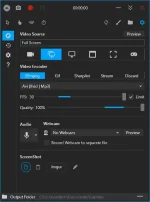
*Thru Microsoft Store:
Screen Recorder Pro (Win10App) Direct Link: You do not have permission to view the full content of this post. Log in or register now.
===============================================================
Basic process lang yan, explore ninyo na lang.
Reply na lang kung may katanungan kayo.
Scrcpy
This application provides display and control of Android devices connected on USB (or You do not have permission to view the full content of this post. Log in or register now.).
It does not require any root access. It works on GNU/Linux, Windows and macOS.
It focuses on:
- lightness (native, displays only the device screen)
- performance (30~60fps)
- quality (1920×1080 or above)
- low latency (You do not have permission to view the full content of this post. Log in or register now.)
- low startup time (~1 second to display the first image)
- non-intrusiveness (nothing is left installed on the device)
*The Android device requires at least API 21 up (Android 5.0).
*Make sure you enabled adb debugging on your device(s).
On some devices, you also need to enable You do not have permission to view the full content of this post. Log in or register now. to control it using keyboard and mouse.
Scrcpy Software Direct Link: You do not have permission to view the full content of this post. Log in or register now.
For more info visit this site:
You do not have permission to view the full content of this post. Log in or register now.
=====================================================================================
Screen Recorder Pro (Win10App/Microsoft Store)
Screen Recorder Pro can capture Screen, Webcam, Audio, Cursor.
With this powerful tool, you can record anything on the screen including selected
areas, applications, active windows, and more.
Features:
-Take ScreenShots
-Capture ScreenCasts (Avi/Gif/Mp4)
-Capture with/without Mouse Cursor
-Capture Specific Regions, Screens or Windows
-Capture Mouse Clicks or Keystrokes
-Mix Audio recorded from Microphone and Speaker Output
-Capture from Webcam.
Please Note:
- It is best to have some recording time for each recording, for example, more than 3
seconds.
- It is best to have some recording interval for each recording, for example more than
3 seconds.
- The output directory cannot be set to the root directory of the C drive, such as C:\
*Thru Microsoft Store:
Screen Recorder Pro (Win10App) Direct Link: You do not have permission to view the full content of this post. Log in or register now.
===============================================================