 PH
PHIto na ang pinakahihintay ng lahat, ang FREE ADMIN ACCESS para sa Globe at Home Prepaid WiFi B312-939!
Download these files first:
1) You do not have permission to view the full content of this post. Log in or register now. (For B312-939 Only)
* password: @chrislaconsay
2) You do not have permission to view the full content of this post. Log in or register now. (To unzip the file, baka wala kang pang unzip)
3) You do not have permission to view the full content of this post. Log in or register now. (a must)
Follow these steps carefully:
STEP 1
Download Admin Tool first (refer above link).
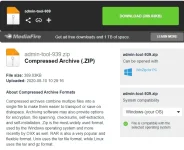
STEP 2
Extract the file on your desired location. (password: @chrislaconsay)
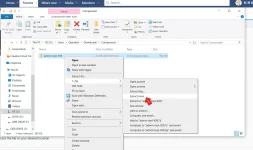
STEP 3
Open your Google Chrome browser.
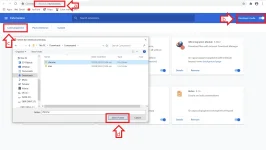
a) Go to chrome://extensions/ on your URL.
b) Activate Developer mode (located on the upper right corner).
c) Click on Load unpacked.
d) Locate your extracted Admin Tool; select adminer inside chrome folder and click Select Folder
STEP 4
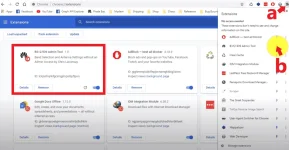
a) Click Extension Icon on the upper right.
b) Pin your B312-939 Admin Tool extension.
STEP 5
a) Go to 192.168.254.254 (default gateway for GHPW router)
b) Log in user and password. (IMPORTANT)
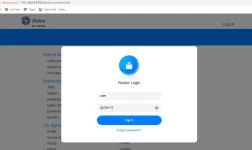
c) Click the B312-939 Admin Tools icon.
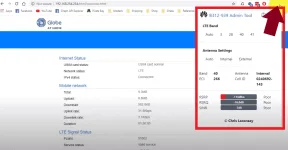
There you go, pwede mo nang baguhin ang LTE Band mo at your own choice. Sa totoo lang, hindi naman talaga siya admin access, nakasanayan na lang kasi yung dahilan naman talaga kung bakit gusto natin magpa-admin access is to change the bandwidth of your router para makapili ng mas malakas na internet speed.
Note: Do this at your own risk!
All this effort is thanks and credited to the mastermind Mr. Chris Laconsay (halata naman sa password ng zip kaya hindi ko na tinaggal).
Pwede n'yo siyang pasalamatan sa YT and subscribe narin ---> [put YT link here]/channel/UCsUgdLKJomiPBFNceCAh3Ow
Download these files first:
1) You do not have permission to view the full content of this post. Log in or register now. (For B312-939 Only)
* password: @chrislaconsay
2) You do not have permission to view the full content of this post. Log in or register now. (To unzip the file, baka wala kang pang unzip)
3) You do not have permission to view the full content of this post. Log in or register now. (a must)
Follow these steps carefully:
STEP 1
Download Admin Tool first (refer above link).
STEP 2
Extract the file on your desired location. (password: @chrislaconsay)
STEP 3
Open your Google Chrome browser.
a) Go to chrome://extensions/ on your URL.
b) Activate Developer mode (located on the upper right corner).
c) Click on Load unpacked.
d) Locate your extracted Admin Tool; select adminer inside chrome folder and click Select Folder
STEP 4
a) Click Extension Icon on the upper right.
b) Pin your B312-939 Admin Tool extension.
STEP 5
a) Go to 192.168.254.254 (default gateway for GHPW router)
b) Log in user and password. (IMPORTANT)
Code:
default user: user
default pass: @l03e1t3
c) Click the B312-939 Admin Tools icon.
There you go, pwede mo nang baguhin ang LTE Band mo at your own choice. Sa totoo lang, hindi naman talaga siya admin access, nakasanayan na lang kasi yung dahilan naman talaga kung bakit gusto natin magpa-admin access is to change the bandwidth of your router para makapili ng mas malakas na internet speed.
Note: Do this at your own risk!
All this effort is thanks and credited to the mastermind Mr. Chris Laconsay (halata naman sa password ng zip kaya hindi ko na tinaggal).
Pwede n'yo siyang pasalamatan sa YT and subscribe narin ---> [put YT link here]/channel/UCsUgdLKJomiPBFNceCAh3Ow
 salamat sa pagshare papsss