 PH
PHRunAwayMuppet
Forum Guru
Increase internet speed by 20% Without Any Software
Microsoft reserves 20% of your available bandwidth for their own purposes like
Windows Updates and interrogating your PC etc.
By un-reserving this bandwidth, you can make your internet connection faster.
By 20%. The steps to be followed are:
Steps:-
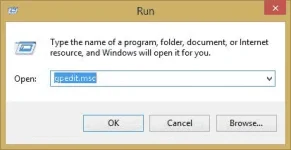
Click Start then Run and type “gpedit.msc” without quotes.
Then go to Local Computer Policy>Computer Configuration>Administrative Templetes>Network>QoS Packet Scheduler. Click on QoS Packet Scheduler. In the right side , find Limit Reservable Bandwidth and double click on Limit Reservable Bandwidth.
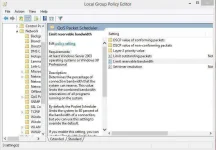
It will say it is not configured but the truth is under the ‘Explain’ tab. Select ‘Enable’ and set reservable bandwidth to zero.
Click on ‘Apply’ and your internet speed will boost up by 20%.
Enjoy
Microsoft reserves 20% of your available bandwidth for their own purposes like
Windows Updates and interrogating your PC etc.
By un-reserving this bandwidth, you can make your internet connection faster.
By 20%. The steps to be followed are:
Steps:-
Click Start then Run and type “gpedit.msc” without quotes.
Then go to Local Computer Policy>Computer Configuration>Administrative Templetes>Network>QoS Packet Scheduler. Click on QoS Packet Scheduler. In the right side , find Limit Reservable Bandwidth and double click on Limit Reservable Bandwidth.
It will say it is not configured but the truth is under the ‘Explain’ tab. Select ‘Enable’ and set reservable bandwidth to zero.
Click on ‘Apply’ and your internet speed will boost up by 20%.
Enjoy

