 PH
PHDOGEPOWPOW
Enthusiast
This is for low end laptops or pc.
In my case I have :
Intel inside processor
6 gb ram DDR3
WINDOWS 8.1 OS
Open dota 2 panorama folder location.
In my case: C:\Program Files (x86)\Steam\steamapps\common\dota 2 beta\game\dota\panorama
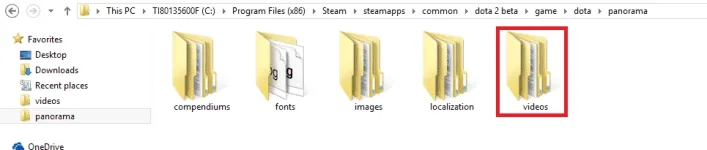
Then open video folder
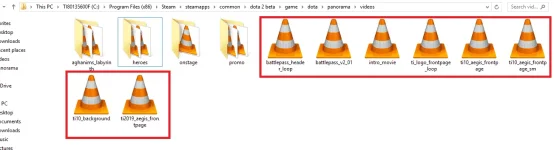
Cut this video files and put it in a new folder. You can name it back up or anything.
DONE. Please do hit like button or just react and also comment down below if you still experience lags.
In my case I have :
Intel inside processor
6 gb ram DDR3
WINDOWS 8.1 OS
Open dota 2 panorama folder location.
In my case: C:\Program Files (x86)\Steam\steamapps\common\dota 2 beta\game\dota\panorama
Then open video folder
Cut this video files and put it in a new folder. You can name it back up or anything.
DONE. Please do hit like button or just react and also comment down below if you still experience lags.