 PH
PHAng function ng program na ito ay katulad lang ng function ng batch file sa thread kong ito, di lang maedit yung post kaya gumawa na lang ng bagong thread. Ang pinagkaiba lang ng paggamit ng app na ito ay hindi bat file ang gagamitin at hindi na need mag copy paste ng path(sumatutal mas madaling gamitin). Once again useful lang ito sa mga taong nagnanais na mag set ng same lock screen for all users at sa mga taong gusto na hindi maiedit ng ordinary users ang lock screen na iseset nila.
Requirements:
Windows OS
You do not have permission to view the full content of this post. Log in or register now.(Written by yours truly using c#)
Steps:
1. Login on administrator account at i-open nyo yung program na nadownload galing sa link sa taas. Ganto ang lalabas dyan.
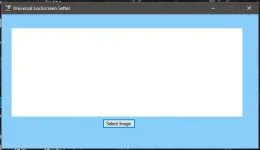
2. Click select image then hanapin nyo yung picture na gusto niyong iset as lockscreen at click open.
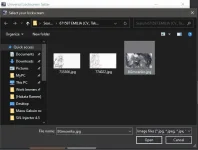
Ipakikita muna niya sa inyo yung sinelect nyo pagka-click nyo ng open.
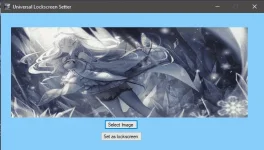
3. Kapag okay na sa inyo yung picture na pinakita sa inyo sa image box, click nyo yung set as lockscreen, kung hindi pa, repeat step 2. Kapag naclick nyo na yung set as lockscreen, wait nyo until lumabas itong notif na ito bago nyo iclose yung program.
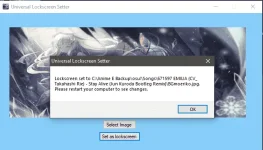
4. Restart your computer to see changes. Makikita nyo na agad yung changes pagka-restart nyo.
Requirements:
Windows OS
You do not have permission to view the full content of this post. Log in or register now.(Written by yours truly using c#)
Steps:
1. Login on administrator account at i-open nyo yung program na nadownload galing sa link sa taas. Ganto ang lalabas dyan.
2. Click select image then hanapin nyo yung picture na gusto niyong iset as lockscreen at click open.
Ipakikita muna niya sa inyo yung sinelect nyo pagka-click nyo ng open.
3. Kapag okay na sa inyo yung picture na pinakita sa inyo sa image box, click nyo yung set as lockscreen, kung hindi pa, repeat step 2. Kapag naclick nyo na yung set as lockscreen, wait nyo until lumabas itong notif na ito bago nyo iclose yung program.
4. Restart your computer to see changes. Makikita nyo na agad yung changes pagka-restart nyo.