 PH
PHDemon_Cyborg
Eternal Poster
Hi mga lodz, share ko lang tong app na ayos na pang-alternative kay Everything for Windows (64/32 bits)
Listary is a revolutionary search utility for Windows
that makes finding your files and launching applications blazing fast, for casual and power users alike!
With just a few clicks you can quickly and easily:
Screenshots to help you make the best out of Listary
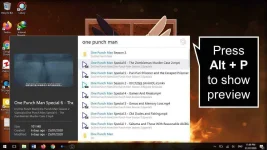
HOTKEYS
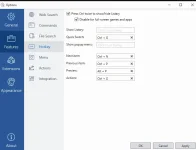
Sample screenshots of the use of Hotkeys
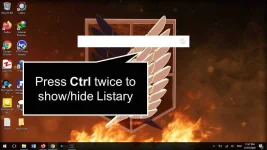
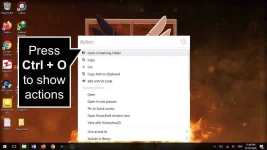

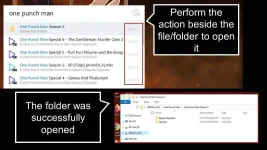
Important Note:
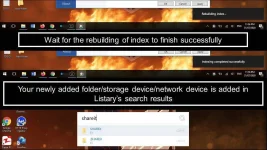
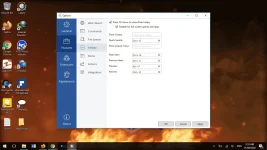
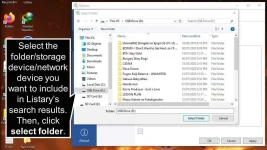
By default, limited lamang sa internal storage devices ang nasesearch ng listary. Hence, you need to update/rebuild the index in order for the app to include external storage devices.
Here are the steps (Please refer to the screenshots below to be guided)
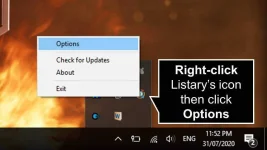
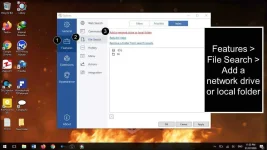
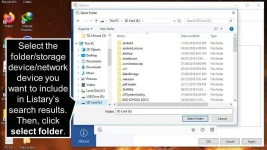
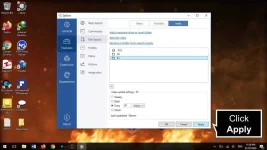
Nadiskubre ko Listary dahil paminsan-minsan ay nagloloko si Everything. The app does not only serves as a file search utility but is also capable of opening applications/programs such as MS Office Suite, CMD, Powershell and many many more. Sana makatulong at maging useful din para sa inyo si Listary mga lodi.
I do not own the product. Full credits goes to the team behind the creation of Listary.
Listary is a revolutionary search utility for Windows
that makes finding your files and launching applications blazing fast, for casual and power users alike!
With just a few clicks you can quickly and easily:
- Search the entire disk drive from any window or folder
- Quickly find any file you need with a few short key strokes
- Instantly find & launch programs with a quick keyboard command
- Copy or move files to any folder from any folder with easy context menu commands
- Open a file with a specific program from anywhere
- Instantly jump from file manager to a target folder with a simple key command
- Create a Favorites list of commonly used files and apps for fast access
- Right-Click any search result for a robust Action+Context menu
- Quickly browse your recent app and file history to continue working where you left off
- Search the web with Listary’s keyword query engine
Screenshots to help you make the best out of Listary
HOTKEYS
Sample screenshots of the use of Hotkeys
Important Note:
By default, limited lamang sa internal storage devices ang nasesearch ng listary. Hence, you need to update/rebuild the index in order for the app to include external storage devices.
Here are the steps (Please refer to the screenshots below to be guided)
Nadiskubre ko Listary dahil paminsan-minsan ay nagloloko si Everything. The app does not only serves as a file search utility but is also capable of opening applications/programs such as MS Office Suite, CMD, Powershell and many many more. Sana makatulong at maging useful din para sa inyo si Listary mga lodi.
I do not own the product. Full credits goes to the team behind the creation of Listary.

 Sana makatulong sayo yung app.