 PH
PHFirst of all, here's the link by cra.cking patching:
my link - You do not have permission to view the full content of this post. Log in or register now.
cra.ckingpatching link - https://cra(remove)ckingpatching.com/2019/08/idm-cra(remove)ck.html

Instructions:


- Run it and you're done.
Simple lang diba kaya install na! xD
Proof na successfull ang iyong pamimirata:
--- Sharing is caring mga pips
--- No need to thank you
my link - You do not have permission to view the full content of this post. Log in or register now.
cra.ckingpatching link - https://cra(remove)ckingpatching.com/2019/08/idm-cra(remove)ck.html
Instructions:
- Disable your anti-virus ( you don't want the police to know you're a pìrâ†é mate )
- Uninstall the previous version that you have ( bawal two timing! Maging loyal ka! ) PS: Use Iobit Uninstaller to uninstall your EX para di mo na kelangan magrestart! Limot agad! Boom!
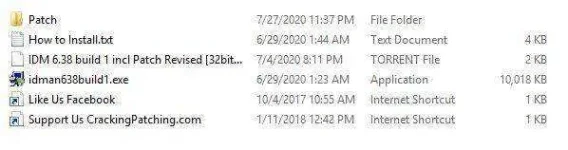
- Unzip the file ( alam na... xD ehemm... mga green!! ) Ang laman ng file, down below:
- First run idman638build1.exe ( Make sure na after you installed it di mo sya io.open. Check your task manager kung nandun ba sya. If yes, end task it. If no, proceed to the next step)
- Open the ρá†ch folder: Ito na naman laman nyan:
- If your system is 64bit unzip 64bit ρá†ch.zip, if 32bit unzip 32bit ρá†ch.zip
- After nyu ma.unzip, may ganitong lalabas dyan:
- Run it and you're done.
Simple lang diba kaya install na! xD
Proof na successfull ang iyong pamimirata:
--- Sharing is caring mga pips
--- No need to thank you
