PH
PHISoldmyMonForEpicSkin
Forum Veteran
Navigation Bar Premium 
Open lahat ng function napaka daling gamitin .
In this post, I am sharing XDA Navigation Gestures Premium Apk in which you can get All Premium Features Unlocked
What is Navigation Gestures Premium Apk?
Jealous of the Android Q (10) New Gesture Navigation Features on Newer Phones?
You don’t have to buy a new device or wait for the next Android update to get Swipe or Side Gesture Controls. Navigation Gestures brings swipe gestures to any Android Phone! Replace the navigation bar buttons & get gesture controls with Navigation Gestures!
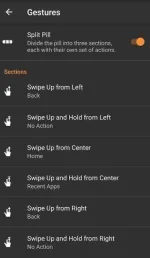
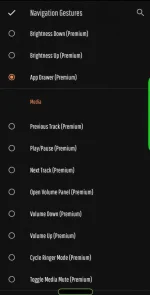
Navigation Gestures Premium Actions: –
Hope u like it!
Open lahat ng function napaka daling gamitin .
In this post, I am sharing XDA Navigation Gestures Premium Apk in which you can get All Premium Features Unlocked
What is Navigation Gestures Premium Apk?
Jealous of the Android Q (10) New Gesture Navigation Features on Newer Phones?
You don’t have to buy a new device or wait for the next Android update to get Swipe or Side Gesture Controls. Navigation Gestures brings swipe gestures to any Android Phone! Replace the navigation bar buttons & get gesture controls with Navigation Gestures!
The Best Part is Navigation Gestures Premium can completely hide the stock navigation bar
Navigation Gestures Premium Actions: –
- Back
- Home
- Recent apps
- Toggle split-screen
- Open the previous app
- Pull down Notifications
- Open Assistant
- Open Power menu
- Skip to previous media song
- Skip to next media song
- Play/pause current media song
- Show keyboard switch dialog
- Lock screen
- Launch app (Any App you choose)
- Take screenshot
- Rotate screen
- Open Flashlight
- Open Bluetooth
- Open WiFi
- Open battery saver
- Open screen timeout
- Open volume panel
- Launch Shortcut
- Launch Activity
- Trigger Tasker Event
- Lower brightness
- Increase brightness
- Open app drawer
- Lower volume
- Increase volume
- Toggle media volume mute
- Cycle ringer mode
Spoiler contents are visible only to Established Members.
Hope u like it!