PH
PHOption 1. Disable the Windows Update Service
Windows Update is essentially just another Windows Service and can be turned off in a similar manner to other services.
Follow these steps to stop Windows 10 updates:
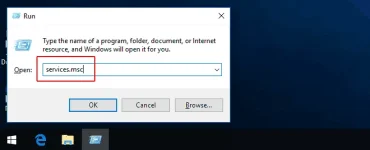
1. Fire up the Run command (Win + R). Type in “services.msc” and hit Enter.
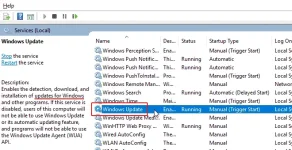
2. Select the Windows Update service from the Services list.
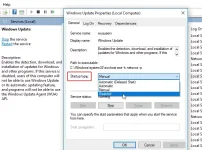
3. Click on the “General” tab and change the “Startup Type” to “Disabled”.
Restart your machine.
When you want to re-enable automatic updates you just follow the same procedure except you select “Automatic” when choosing the “Startup Type”.
Option 2. Set Up a Metered Connection
If you are using WiFi to connect your Windows 10 machine to the Internet, you have the option of setting up a metered connection. In a metered connection, bandwidth is conserved by only automatically downloading and installing priority updates.
Microsoft’s method of classification may remain a mystery, but driver and software feature updates that may cause stability problems are minimized by opting for this option for stopping Windows 10 automatic updates.
To disable Windows 10 updates:
1. Open the Windows Settings application (Win+ I).
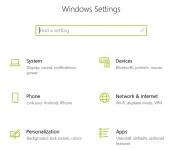
2. Click on the ‘Network & Internet’ section.

3. Open ‘Wi-Fi’ and click the ‘Manage known networks’.
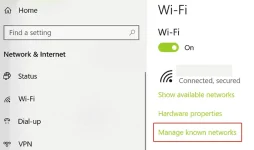
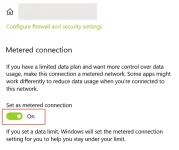
4. Select network and in ‘Properties‘ toggle the ‘Set as metered connection’ option to ‘On’.
Windows Update is essentially just another Windows Service and can be turned off in a similar manner to other services.
Follow these steps to stop Windows 10 updates:
1. Fire up the Run command (Win + R). Type in “services.msc” and hit Enter.
2. Select the Windows Update service from the Services list.
3. Click on the “General” tab and change the “Startup Type” to “Disabled”.
Restart your machine.
When you want to re-enable automatic updates you just follow the same procedure except you select “Automatic” when choosing the “Startup Type”.
Option 2. Set Up a Metered Connection
If you are using WiFi to connect your Windows 10 machine to the Internet, you have the option of setting up a metered connection. In a metered connection, bandwidth is conserved by only automatically downloading and installing priority updates.
Microsoft’s method of classification may remain a mystery, but driver and software feature updates that may cause stability problems are minimized by opting for this option for stopping Windows 10 automatic updates.
To disable Windows 10 updates:
1. Open the Windows Settings application (Win+ I).
2. Click on the ‘Network & Internet’ section.
3. Open ‘Wi-Fi’ and click the ‘Manage known networks’.
4. Select network and in ‘Properties‘ toggle the ‘Set as metered connection’ option to ‘On’.