 PH
PHDisabling security updates
Windows 10 also offers an option to defer only quality updates for up to 30 days.
To disable security updates on Windows 10, use these steps:

5. Under the "Pause updates" section, use the drop-down menu, and select the number of days you want to defer quality updates (up to 30 days).
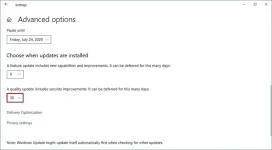
After you complete the steps, your computer won't download and install monthly quality updates until the schedule reaches its limit, or you change the setting back to zero.
How to stop automatic updates on Windows 10
Disabling all updates
Disabling feature updates
Windows 10 also offers an option to defer only quality updates for up to 30 days.
To disable security updates on Windows 10, use these steps:
- Open Settings.
- Click on Update & Security.
- Click on Windows Update.
- Click the Advanced options button.
5. Under the "Pause updates" section, use the drop-down menu, and select the number of days you want to defer quality updates (up to 30 days).
After you complete the steps, your computer won't download and install monthly quality updates until the schedule reaches its limit, or you change the setting back to zero.
How to stop automatic updates on Windows 10
Disabling all updates
Disabling feature updates