 PH
PHRunAwayMuppet
Forum Guru
Please note that results from 3rd party speed test servers may differ greatly (You do not have permission to view the full content of this post.
Log in or register now.)
Measurement are based on peak hours (1pm to 10pm) Network congestion is generally most common in the evening when more people in your area are at home and online
The speed of your connection also depends on the distance between your terminal device and the network centralizer. The further you live from the operator's broadband centralizer, the more it affects the speed of your connection. (signal varies depending on the coverage area.)
My technique (changing frequency band)
Using Band 1
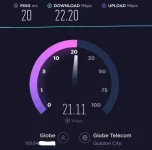
Using Band 40
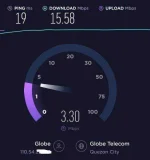
Using Band 41
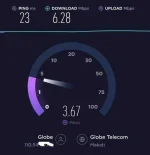
Using Band 28 (speed on mobile phone)
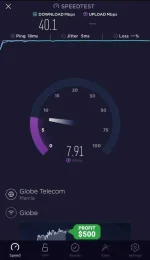
Measurement are based on peak hours (1pm to 10pm) Network congestion is generally most common in the evening when more people in your area are at home and online
The speed of your connection also depends on the distance between your terminal device and the network centralizer. The further you live from the operator's broadband centralizer, the more it affects the speed of your connection. (signal varies depending on the coverage area.)
My technique (changing frequency band)
Using Band 1
Using Band 40
Using Band 41
Using Band 28 (speed on mobile phone)
 ang punto ko po in order na mag improve yung kasalukuyang speed nila sa mga oras na yan (peak/congestion) subukan nila mag palit ng frequency band para makita nila yung significant change(s) sa net speed nila instead of sticking kung anong yung malapit o malayo sa tower nila