 PH
PHNote: You can debloat other devices(brand) with this tool despite of having a "Xiaomi" on its name.
Requirements:
1. Windows PC
2. Internet (to download the files)
3. USB cord(from phone to pc connection)
Setting up the debloating tool:
1. Download the latest release here You do not have permission to view the full content of this post. Log in or register now.
2. Download Oracle Java from You do not have permission to view the full content of this post. Log in or register now. or OpenJDK from You do not have permission to view the full content of this post. Log in or register now.. ( the Xiaomi ADB/Fastboot Tools was developed in Kotlin for the Java Virtual Machine so it needs the JRE to run, version 11 or later. )
3. After installing, Enable USB debugging in Android.
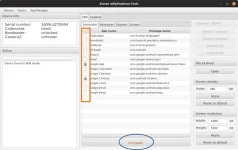
5. Wait for the application to detect your device. The device info should appear in the top left section.
HOW TO DEBLOAT?
1. Check all the apps that you want to remove.
2. Click the uninstall button.
Note: DIsabled apps can be restored after doing a full reset.
Requirements:
1. Windows PC
2. Internet (to download the files)
3. USB cord(from phone to pc connection)
Setting up the debloating tool:
1. Download the latest release here You do not have permission to view the full content of this post. Log in or register now.
2. Download Oracle Java from You do not have permission to view the full content of this post. Log in or register now. or OpenJDK from You do not have permission to view the full content of this post. Log in or register now.. ( the Xiaomi ADB/Fastboot Tools was developed in Kotlin for the Java Virtual Machine so it needs the JRE to run, version 11 or later. )
3. After installing, Enable USB debugging in Android.
- MIUI: Go to Settings > Additional settings > Developer options and enable USB debugging.
- Android One: Go to Settings > System > Developer options and enable USB debugging.
- Samsung : https://phc.onl/#forbidden#/SxKQH5LY1PM
5. Wait for the application to detect your device. The device info should appear in the top left section.
HOW TO DEBLOAT?
1. Check all the apps that you want to remove.
2. Click the uninstall button.
Note: DIsabled apps can be restored after doing a full reset.