PH
PHXenzoro Configs
Forum Expert
* J A P A Y U K I S E R V E R
✔Mas ok kesa APN Trick
✔Pwede sa IOS/ANDROID/LAPTOP ( Windows 10 )
✔No Need VPN APP
✔Tipid Battery Pa
✔Ok sa Youtube at Netflix
✔Ok sa Browsing
✔Ok Kayuh Lami Kayuh
✔Tested ONLINE GAME (Clash of Clans )
)
Sun only
==============================
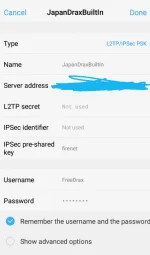
Username : FreeDrax
Password : FreeDrax
Preshared key : firenet
Click to get Server Adress Click Spoiler :
Permission to post Admin
Paki Remove yung imoji at space.
==============================
Validity period : Unknown Expiry
Android/IOS Setup:
1. Go to settings
2. Hanapin ang VPN
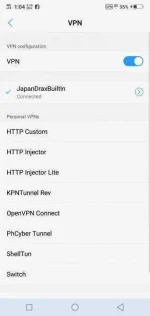
3. Iclick ang plus (+) sign o add vpn
4. Gayahin lang yung nasa screenshot.
5. Lagay nyo yung preShared Key dun sa IPSec preshared key.
6. Dun sa Show Advanced Options kahit meron o wala.
Laptop ( Windows 10 ) setup:
1. Goto Settings
2. Then Click [ Network & Internet ]
3. Then Click nyu yung [ VPN ]
4. Click Nyu yung (+)
5. Sa VPN PROVIDER Select "Windows (built in)"
6. Sa Connection Name Kahit Anong Trip mo
7. Ilagay yung Server adress
8. Sa VPN type Select L2TP/IPsec with pre-shared key
▪N O T F O R S A L E!
ENJOY!
 WARNING SUN USERS
Limit your usage to 2GB/day (para safe)
Kung sanay kang lumagpas sa 2GB/day, IKAW na swerte
Wag kalimutang mag feed back at magpasalamat para ako ay GANAHAN✌.
- AkoSiDrakath
Feed back is a must!
J A P A Y U K I S E R V E R ✔Mas ok kesa APN Trick
✔Pwede sa IOS/ANDROID/LAPTOP ( Windows 10 )
✔No Need VPN APP
✔Tipid Battery Pa
✔Ok sa Youtube at Netflix
✔Ok sa Browsing
✔Ok Kayuh Lami Kayuh
✔Tested ONLINE GAME (Clash of Clans
)Sun only
==============================
Username : FreeDrax
Password : FreeDrax
Preshared key : firenet
Click to get Server Adress Click Spoiler :
Spoiler contents are visible only to Established Members.
Permission to post Admin
Paki Remove yung imoji at space.
==============================
Validity period : Unknown Expiry
Android/IOS Setup:
1. Go to settings
2. Hanapin ang VPN
3. Iclick ang plus (+) sign o add vpn
4. Gayahin lang yung nasa screenshot.
5. Lagay nyo yung preShared Key dun sa IPSec preshared key.
6. Dun sa Show Advanced Options kahit meron o wala.
Laptop ( Windows 10 ) setup:
1. Goto Settings
2. Then Click [ Network & Internet ]
3. Then Click nyu yung [ VPN ]
4. Click Nyu yung (+)
5. Sa VPN PROVIDER Select "Windows (built in)"
6. Sa Connection Name Kahit Anong Trip mo
7. Ilagay yung Server adress
8. Sa VPN type Select L2TP/IPsec with pre-shared key
▪N O T F O R S A L E!
ENJOY!
WARNING SUN USERS Limit your usage to 2GB/day (para safe)
Kung sanay kang lumagpas sa 2GB/day, IKAW na swerte
Wag kalimutang mag feed back at magpasalamat para ako ay GANAHAN✌.
- AkoSiDrakath
Feed back is a must!